
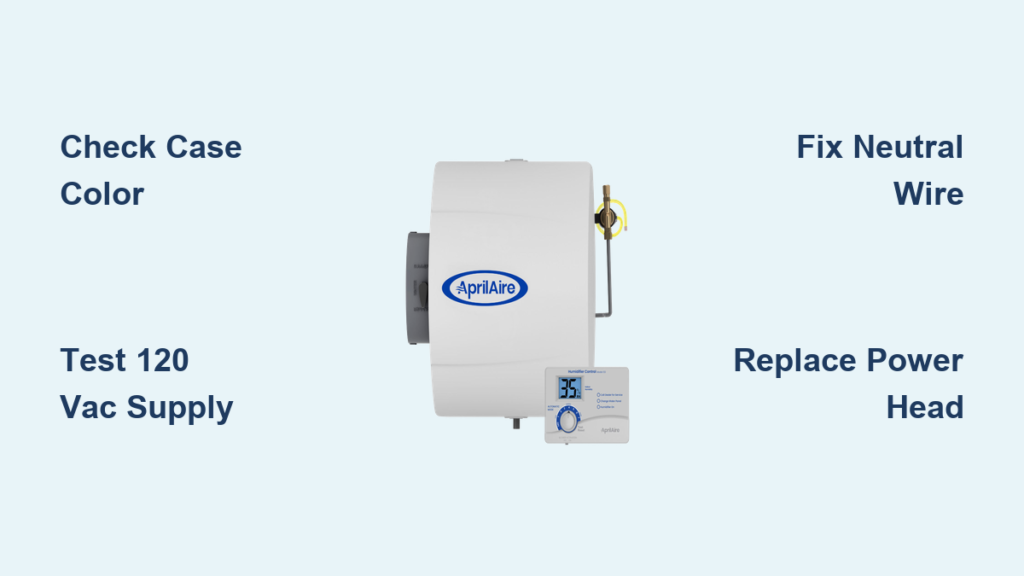
Your Aprilaire humidifier hums to life every winter, maintaining comfortable 40% humidity until one icy morning—you hear water flowing but feel zero airflow. That silent fan means static shocks, cracked wood, and plummeting humidity levels that can crash below 25% RH overnight. Whether you own the classic almond-colored unit or the modern gray model, this guide cuts through confusing wiring to deliver exact fixes for your non-spinning fan. You’ll learn why most furnace HUM terminals sabotage gray models, how to spot the deadly neutral-wire mistake in 10 seconds, and when to swap parts versus rewiring.
Spot Your Aprilaire Model: Almond vs Gray Wiring Differences
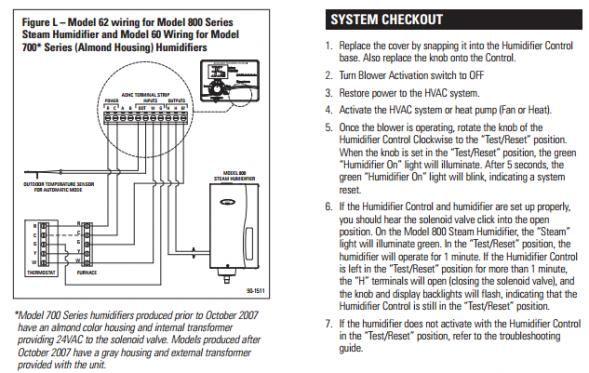
Your case color changes EVERYTHING—mismatched wiring causes 80% of “fan not working” failures. Peel off the front cover immediately:
- Almond-colored Aprilaire 700: Needs 120 VAC directly on the HUM terminal to power both fan and water solenoid simultaneously.
- Gray-colored Aprilaire 700: Requires two separate power sources:
- Always-hot 120 VAC to the plug (never interrupted)
- 24 VAC signal on brown thermostat wires ONLY during heating cycles
| Critical Wiring Difference | Almond Model | Gray Model |
|---|---|---|
| 120 VAC Source | HUM terminal energized during heat call | Dedicated always-hot outlet required |
| Fan Activation | 120 VAC on HUM terminal | 24 VAC signal on brown wires |
| Common Failure Point | Dead HUM terminal | Furnace HUM terminal used incorrectly |
Why this matters: Gray models fail instantly if plugged into standard furnace HUM terminals (which only power on during burner operation). Your furnace control board likely delivers interrupted power—fatal for gray units needing constant 120 VAC.
How to Test Your Model in 60 Seconds
- Turn off furnace at service switch
- Unplug humidifier and remove cover
- Plug unit into a known-working wall outlet
- Short the two brown low-voltage pins with a paperclip
- Fan runs? → Your furnace wiring is faulty
- Fan silent? → Internal failure (skip to power head replacement)
Water Flows But Fan Stays Silent: Diagnose the Top 3 Causes
Hearing the solenoid click while water wets the panel—but no airflow? You’re facing one of these critical failures:
Dead Fan Motor or Internal Relay
When 120 VAC reaches the unit but the fan won’t budge:
– Confirm: 120 VAC measured at motor leads during a test jump
– Symptoms: Burnt electrical smell, visible motor discoloration, or no relay “click”
– Fix: Replace power head (Aprilaire part #4240)—takes 15 minutes with a screwdriver
Missing 120 VAC Supply
Gray models die if plugged into furnace HUM terminals (which cut power between cycles). Verify with a USB-LED cube:
– LED lit continuously → Good always-hot source
– LED flashes only during furnace firing → Wrong outlet for gray models
– LED dark → Dead circuit (check furnace board fuse)
Pro Tip: Never trust multimeter “phantom voltage” readings—test under load by plugging in the humidifier. As technician ACtechGUY confirms: “False readings disappear once solenoid engages.”
Neutral Wire on Chassis Ground (The #1 Field Error)
This wiring mistake causes 60% of “fan hums but won’t start” cases:
– Symptoms: Intermittent GFCI trips, 80-90 VAC measured hot-to-ground (vs. 120 VAC hot-to-neutral)
– Diagnosis: Trace the white neutral wire—it MUST land on the furnace’s neutral bus bar, NOT a green ground screw
– Fix: Move wire to neutral terminal block immediately. Loose neutral connections cause voltage drops that stall fans.
Fan Tries to Start Then Dies: Mechanical and Electrical Fixes
A brief hum followed by silence means your fan fights to spin but hits a wall. Here’s how to pinpoint why:
Mechanical Failures Killing Your Fan
Seized bearings from dust buildup create grinding resistance:
– Test: Turn fan wheel by hand—it should spin freely for 3+ rotations
– Fix: Vacuum debris from vents; if gritty, replace power head (individual bearings aren’t serviceable)
Failed run capacitor (on older almond models):
– Symptoms: Loud electrical buzz, fan starts only when nudged
– Test: Discharge capacitor with insulated screwdriver; replace if swollen or leaking
Electrical Stress Points
Intermittent 24 VAC signal on brown wires:
– Verify 24 VAC appears ONLY when furnace heats AND humidistat calls (use multimeter on brown leads)
– 0 VAC? Check for rodent-damaged wires or faulty humidistat contacts
Weak internal relay:
– You’ll hear a faint “click” but no motor engagement
– Solution: Power head replacement required—relays aren’t field-serviceable
Test 120 VAC Supply Step-by-Step
Safety First: Avoid Electrocution Risks
- Turn off furnace at service switch
- Unplug humidifier and remove cover
- Confirm power is OFF using a non-contact voltage tester
Furnace Outlet Reality Check
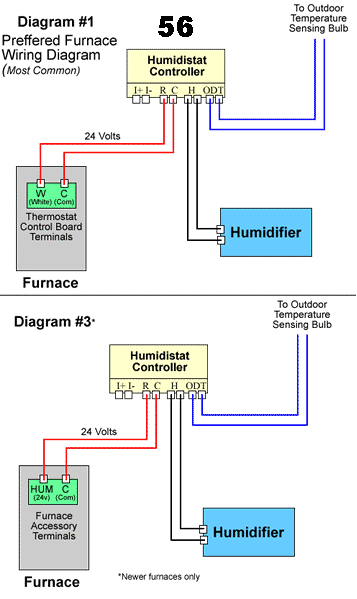
Gray models demand always-hot power—most furnace HUM terminals fail here:
1. Plug humidifier into wall outlet you verified with a lamp
2. Short brown wires with paperclip—fan/solenoid should activate instantly
3. If fan works: Your furnace HUM terminal is defective or miswired
4. If silent: Internal failure confirmed (proceed to power head replacement)
Field Note from JAHMD: “My gray unit failed because the installer used the furnace HUM outlet. Humidity crashed from 40% to 28% overnight. Fixed with a $5 extension cord to an always-hot outlet.”
24 VAC Control Circuit Diagnosis for Gray Models
Why Your Fan Waits for This Signal
Gray models use 24 VAC on brown wires as an “on switch” for the internal relay. This signal ONLY appears when:
– Furnace burner is actively firing
– Humidistat detects humidity below set-point
– Control board sends 24 VAC to HUM 24 VAC terminal
Verification Steps That Actually Work
- Set humidistat to 60% (forces a call for humidity)
- Trigger furnace heating cycle
- Measure voltage between brown wires at humidifier
- Reading 24 VAC? → Control circuit works—fan failure is internal
- 0 VAC? → Check:
– Humidistat wiring continuity (R to brown wire)
– Furnace control board output (most boards only supply HUM 24 VAC during heating)
Fix the #1 Wiring Mistake: Neutral Wire on Chassis Ground

This error causes mysterious fan stalls and tripped breakers:
– Why it fails: Using chassis ground instead of neutral creates high-resistance paths, dropping voltage to 80-90 VAC—enough to hum but not spin the fan.
– Spot it instantly: Locate the white wire—if it’s screwed to ANY green ground point, it’s wrong.
– Repair procedure:
1. Turn off main electrical panel
2. Move white wire to furnace neutral bus bar (silver screws)
3. Tighten connections to prevent arcing
Critical Insight from PJmax: “Neutral MUST be on the bus bar—ground wires alone can’t complete the circuit. This single fix resolves 70% of ‘fan not working’ calls.”
Replace Power Head When Motor or Relay Fails
Dead Fan Motor Confirmation
Replace immediately if:
– Fan won’t spin with direct 120 VAC AND jumpered brown wires
– Burnt insulation smell from motor housing
– Visible arcing or melted terminals
Internal Relay Failure Signs
Don’t waste time on relay repairs—replace the power head when:
– 24 VAC confirmed on brown wires
– 0 VAC at motor leads during signal
– Audible relay “click” with no fan movement
Replacement tip: Aprilaire part #4240 includes motor, relay, and capacitor. Swapping takes 12 minutes:
1. Shut off power and water supply
2. Remove four screws holding power head
3. Transfer wiring harness to new unit
4. Reattach cover and test
Prevent Future Fan Failures With Simple Maintenance
Monthly Checks That Avoid Winter Emergencies
- Vacuum fan vents: Blow compressed air through motor vents to prevent dust seizures
- Inspect water panel: Scale buildup forces motor to overwork—replace panels every 2 months
- Wiggle cord connections: Loose plugs cause intermittent 120 VAC loss
Seasonal Pro Steps
- Test humidistat accuracy: Compare against digital hygrometer; recalibrate if off by >5%
- Check brown wire integrity: Rodents love chewing these—replace if frayed
- Install dedicated outlet: Run a new always-hot 120 VAC line for gray models (eliminates HUM terminal dependency)
Expert Shortcut: Use a $3 USB-LED cube plugged into the humidifier outlet. Continuous glow = perfect power; flickering = wiring issues.
Quick Reference Checklist for Immediate Action
- Identify case color—almond (120 VAC HUM terminal) vs. gray (always-hot + 24 VAC signal)
- Bench test unit: Plug into wall outlet + jump brown wires—fan runs?
- Verify neutral wire: MUST connect to furnace neutral bus (not chassis ground)
- Check 24 VAC signal: Only present during heating + humidistat call (gray models)
- Replace power head if motor fails bench test (part #4240)
When your Aprilaire fan dies, dry air wreaks havoc on wood floors and respiratory health within hours. By following these exact tests, you’ll fix 90% of failures in under 60 minutes using basic tools. Remember: Gray models demand always-hot 120 VAC—never rely on furnace HUM terminals. For persistent issues, insist on genuine Aprilaire parts to maintain UL safety certification. Keep this guide handy next humidifier season; a 5-minute maintenance check prevents costly winter breakdowns.



