
Your Blueair purifier’s fan suddenly stops spinning, leaving you without the clean air you rely on. This frustrating situation affects thousands of Blueair owners annually, with most cases stemming from simple issues you can fix in under 10 minutes. The good news is that your “broken” fan likely isn’t broken at all—it’s probably locked, blocked, or just needs a quick reset. This guide delivers the exact troubleshooting steps Blueair technicians use to diagnose fan failures, so you can restore proper airflow without waiting for customer service.
Before you consider replacing your purifier or scheduling a service call, work through these proven solutions. Most Blueair fan problems originate from preventable causes like accidental button presses, clogged filters, or power issues—not internal hardware failures. Let’s systematically eliminate each possibility starting with the most common culprits.
Child Lock Activation Check
Your unresponsive fan button might actually be locked rather than broken. Blueair’s Child Lock feature frequently causes panic when owners accidentally activate it during routine cleaning or when adjusting settings near curious children.
When Child Lock engages, your Fan button completely stops responding while other functions like power work normally. You’ll notice the unit powers on and off with the On/Standby button, but fan speed adjustments do nothing. This safety feature prevents accidental setting changes but can easily get activated without your knowledge.
How to fix it: Press and hold the On/Standby button for exactly five seconds. Watch for the indicator LEDs to blink once, confirming successful deactivation. The Fan button will immediately regain functionality. If this doesn’t work, try holding the button for 7-10 seconds—some models require slightly longer presses. Important: If your fan remains unresponsive after this step, move to the next troubleshooting section immediately.
Power Connection Verification
Electrical issues cause nearly 30% of reported “fan not working” cases, yet most owners skip these simple checks. Before assuming hardware failure, verify your entire power supply chain with these specific steps:
- Inspect both cord connections – Unplug your purifier and examine where the cord attaches to the unit. Check for bent pins or debris preventing proper contact. Repeat for the wall outlet end.
- Locate and flip the power switch – Many Blueair models have a physical power switch on the back or side that gets accidentally bumped during cleaning. Ensure it’s firmly in the ON position.
- Reset your circuit breaker – Go to your electrical panel and find the breaker controlling the outlet. Flip it fully OFF, then back ON to properly reset it.
- Test with different outlet – Unplug your purifier for 5 minutes, then connect to an outlet on a different circuit. Pro tip: Avoid using extension cords or power strips during testing—they often cause voltage drops that prevent proper operation.
If these steps don’t restore function within 15 minutes, your issue likely requires more advanced troubleshooting.
Factory Reset Procedure
Software glitches can freeze your Blueair purifier’s controls, making the fan appear non-functional when the problem is actually electronic. A factory reset clears temporary errors and recalibrates internal systems—often solving “fan not working” issues in under 2 minutes.
Before resetting: Be aware this action will reset your filter timer to zero (requiring manual reset after next filter change) and disconnect your unit from the Blueair app. Have your Wi-Fi credentials ready for reconnection.
How to reset: Press and hold your main control button for 10-15 seconds until the unit responds. Most models display a light sequence indicating reset initiation. After completion (typically 30 seconds), reconnect to the Blueair app by selecting “Connect” in the app menu and following pairing instructions. Test all fan speeds to confirm functionality.
Filter-Related Issues

Your Blueair purifier’s fan may have stopped working because of filter problems—either due to safety mechanisms or physical blockage. Filters directly impact fan operation through multiple protection systems.
Reset filter indicator: If your filter replacement light won’t clear, press and hold the main button for 10 seconds. This resets the timer and may restore fan operation if the unit was in protective shutdown mode.
Check for clogged filters: Remove your front cover and inspect the filter for heavy dust accumulation. If you can’t see the filter material through the dust layer, it’s severely clogged. Warning: Operating with a clogged filter can permanently damage the fan motor—replace filters every 6 months under normal conditions.
Verify proper installation: Ensure filters are correctly oriented and fully seated. Many users report fan issues simply because the filter shifted during cleaning. Reinstall the filter, then firmly reattach the cover until you hear all clips engage.
Decode Indicator Lights

Your Blueair purifier’s lights provide crucial diagnostic information about why your fan stopped working. Learning these signals saves hours of unnecessary troubleshooting.
- Cycling lights (red→yellow→blue, repeating 8 times): Indicates a specific error condition requiring attention. Note the pattern and contact Blueair support with this information.
- Lights on but fan motionless: Confirms power reaches the unit but suggests motor or driver circuit failure—likely requiring warranty service.
- Solid red/orange light: Your filter needs immediate replacement. Replace the filter, then reset the timer.
- No lights visible: Check power connections first. If connections are secure, the unit may have a blown internal fuse.
Airflow Blockage Problems
Restricted airflow can make it seem like your fan stopped working when it’s actually running but unable to move sufficient air. These blockages trigger safety mechanisms that reduce or halt fan operation.
Clear intake and exhaust paths:
– Remove both grilles and inspect for dust bunnies, pet hair, or debris
– Clean grilles with a soft brush or vacuum attachment
– Ensure at least 12 inches of clearance around all sides of the unit
– Critical check: Verify your air quality sensor is clean—use a vacuum to remove dust from sensor openings
Model Power Specifications
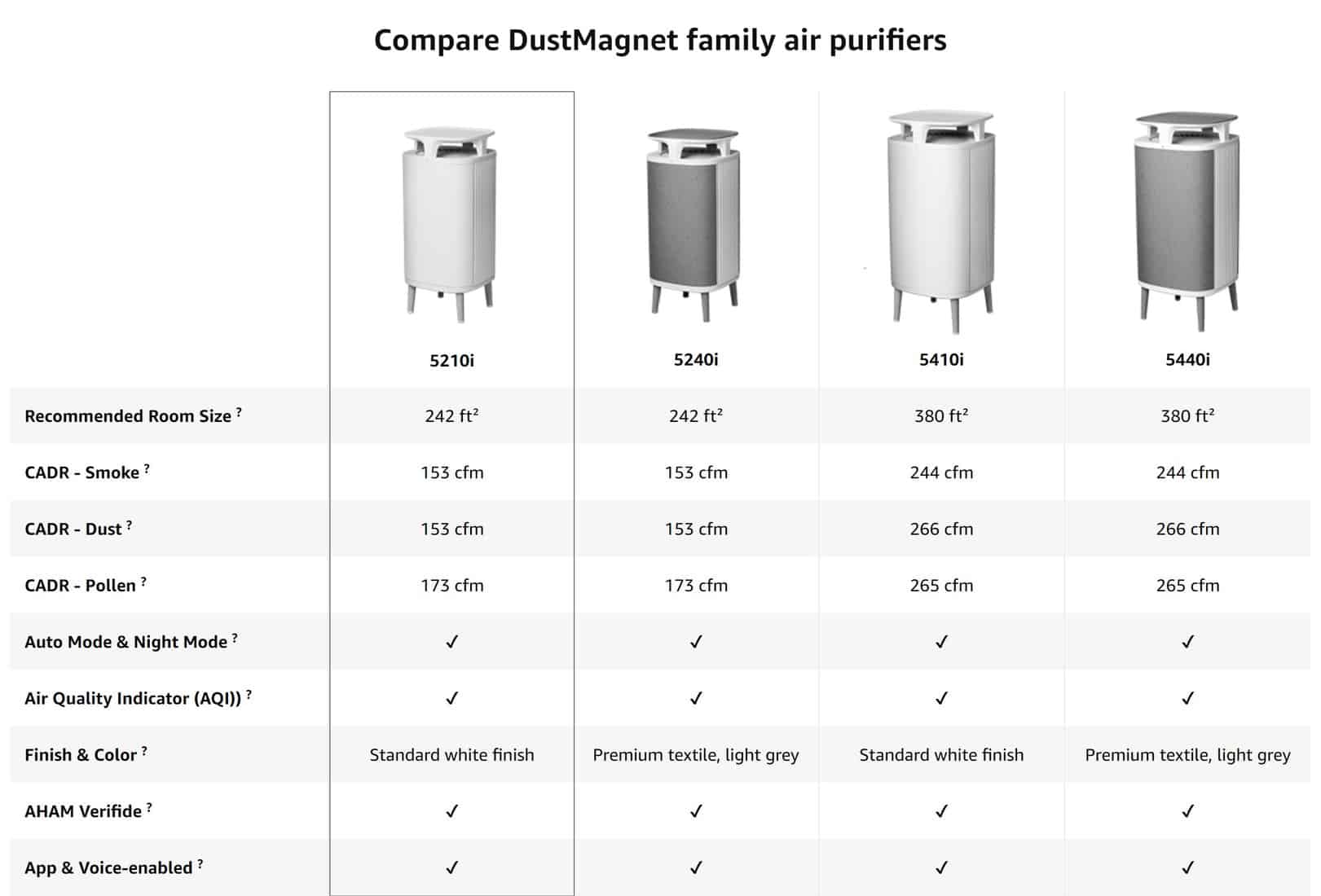
Understanding your specific model’s power requirements helps diagnose electrical issues. Different Blueair series operate at varying wattage levels:
- DustMagnet series: 5-42W depending on model (5240i: 5-22W, 5440i: 7-42W)
- Blue Pure series: 1.5-61W (411 Auto: 2-10W, 211+ Auto: 4-38W)
- Classic/Pro series: 11-100W (Classic 605: 15-100W)
- Protect series: 8-76W (Protect 7770i: 8-76W)
If your unit draws significantly less power than its specification, the fan motor may be failing—contact warranty support immediately.
Warranty Support Options
When troubleshooting fails and your Blueair purifier remains non-functional, warranty coverage provides a solution path. Blueair typically covers units for one year from purchase date, even without your receipt.
Maximize your warranty claim:
1. Locate your model and serial number (usually on bottom or back)
2. Document all troubleshooting steps attempted
3. Contact Blueair support via email or online form
4. Pro tip: Mention specific error patterns like light sequences—they expedite replacement decisions
Many users report receiving replacement units within 3-5 business days when their case qualifies for warranty coverage.
Prevent Future Fan Issues
Regular maintenance prevents most fan failures before they occur. Implement these practices to keep your Blueair purifier running smoothly:
- Replace filters every 6 months (or 3 months with pets)
- Clean exterior grilles monthly with a soft cloth
- Vacuum sensors quarterly to maintain accurate readings
- Position unit properly with 12+ inches clearance on all sides
Final Tip: Most Blueair fan issues resolve through systematic troubleshooting. Work through these steps in order—from simplest fixes like power checks to more complex diagnostics. If your unit remains non-functional after completing all steps and is still under warranty, contact Blueair support immediately for replacement. Don’t let a temporary fan issue compromise your home’s air quality—restore clean airflow today using these proven solutions.



