
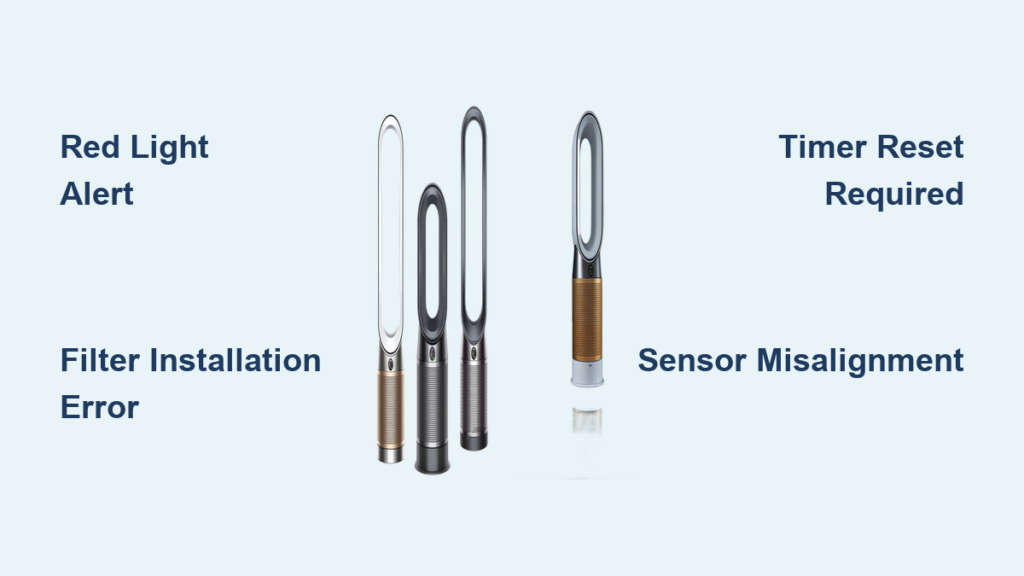
That blinking red light on your Dyson air purifier means your unit has stopped protecting your indoor air quality and needs immediate attention. Unlike the gentle yellow warning that filters are nearing replacement, a red alert signals your purifier has entered protective shutdown mode—it’s refusing to circulate air until you resolve the underlying issue. Most owners panic when they see this critical indicator, but the truth is, over 90% of blinking red light problems can be fixed in under 10 minutes with the right approach.
Dyson air purifiers don’t use physical sensors to detect filter condition—they rely on an internal countdown timer based on usage hours. When this timer reaches zero or the system detects an anomaly, it triggers the red light as a safety measure. The good news is that most causes are user-serviceable issues rather than catastrophic failures. Understanding why your Dyson flashes red—and how to fix it properly—gets clean air flowing through your home again without unnecessary service calls.
Dyson Red Light Emergency: Immediate Meaning and Response
Your Dyson air purifier’s blinking red light functions as a critical safety mechanism that prevents operation with compromised filtration. When triggered, the unit completely stops fan operation and air cleaning until the issue is resolved. This ensures you don’t unknowingly breathe unfiltered air while believing your purifier is protecting you—particularly important for households with allergies, asthma, or vulnerable family members.
Dyson units display the red light in different patterns that indicate specific severity levels. A steady red glow typically signals a critical failure requiring immediate action. A blinking or flashing red light suggests an active alert condition that may resolve with proper troubleshooting. A pulsing red light during startup usually means the system is performing self-diagnostic checks—which is normal behavior and should clear within 30 seconds.
Critical warning: Never ignore a persistent red light. Unlike yellow or orange indicators that simply suggest upcoming maintenance, a red alert means your air purifier has stopped functioning properly. Continuing to use the unit defeats this safety feature and allows poor indoor air quality to persist without your knowledge.
5 Filter Installation Mistakes Causing Persistent Red Blinking
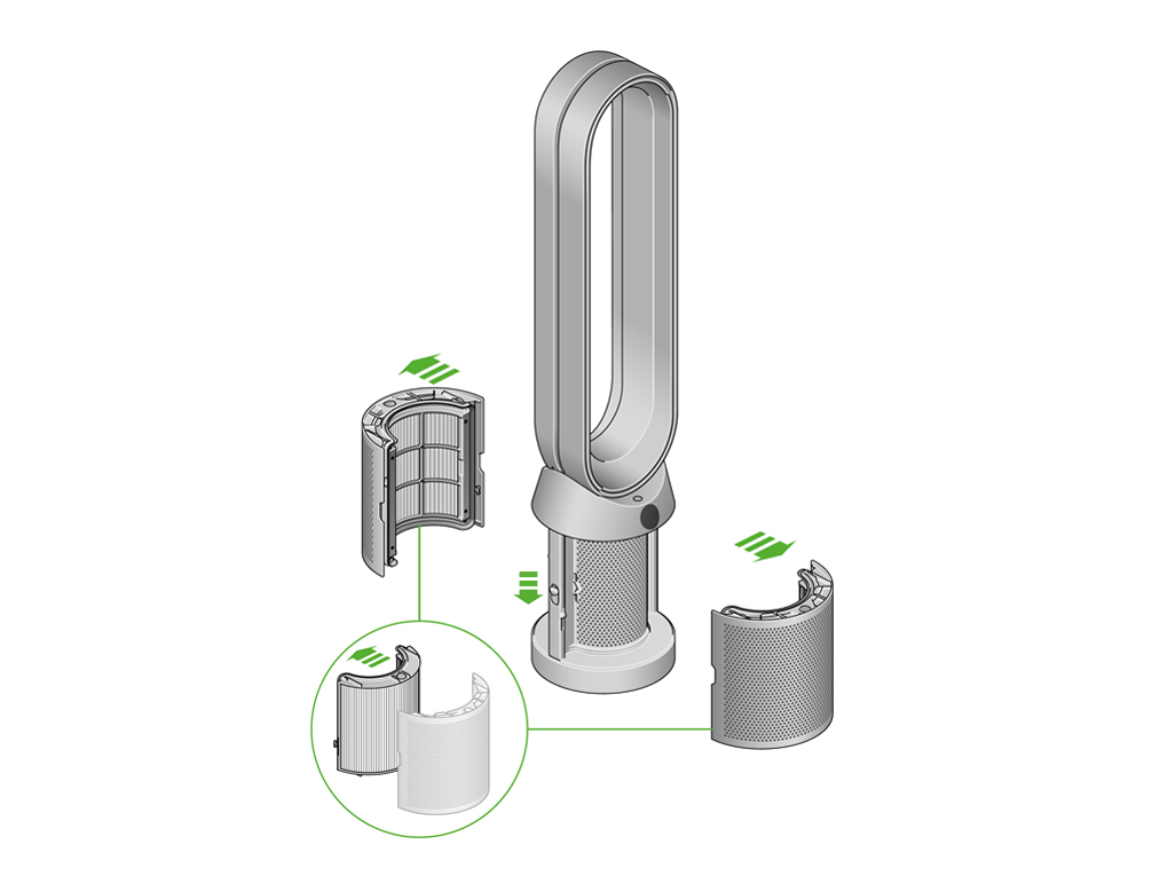
Most red light emergencies happen immediately after filter replacement—ironically, when you’re trying to improve air quality. Identifying which installation mistake affects your unit determines the right solution.
Plastic Wrap Left on New Filters Triggers Instant Alert
Approximately 30% of red light emergencies occur because users miss the thin plastic film sealing carbon filter layers. This transparent wrap often looks like protective coating and completely blocks airflow. Before installation, run your fingernail along all filter edges to detect hidden plastic remnants—check both the HEPA and carbon filter components. Either one covered in packaging film will trigger an immediate red alert within seconds of startup.
Filter Orientation Errors by Model Type
Dyson filters feature directional arrows molded into their frames indicating correct installation orientation. Installing the filter backward creates unnatural airflow resistance that the system interprets as severe blockage. For PH01 and PH02 models, arrows must point upward toward the fan assembly. In TP04 units, arrows should align with the “AIR FLOW” engraving inside the compartment. A backward filter triggers the red light within 15 seconds of startup—check your model’s specific requirements before assuming proper orientation.
Incomplete Filter Seating Causes Intermittent Blinking
A filter that seems installed but isn’t fully seated creates microscopic gaps where unfiltered air bypasses the media entirely. After insertion, press firmly along the entire filter perimeter until you hear distinct double-clicks at both ends. Your knuckles should feel seamless contact with the housing with no ridges or gaps. Poor seating causes intermittent red blinking during operation as airflow fluctuates inconsistently—this mistake accounts for nearly 25% of post-installation red alerts.
Timer Synchronization Failure After New Filter
The most frequent cause of post-replacement red lights is that the internal filter timer hasn’t synced with your new filter. The system continues tracking the old filter’s usage hours and assumes you’re running expired media. This triggers the red alert as a protective measure, even though you’ve just installed a fresh filter. Resolving this requires manually resetting the timer through your remote or the unit’s base button—simply installing a new filter isn’t enough.
Hidden Metal Sensor Misalignment in Filter Bay
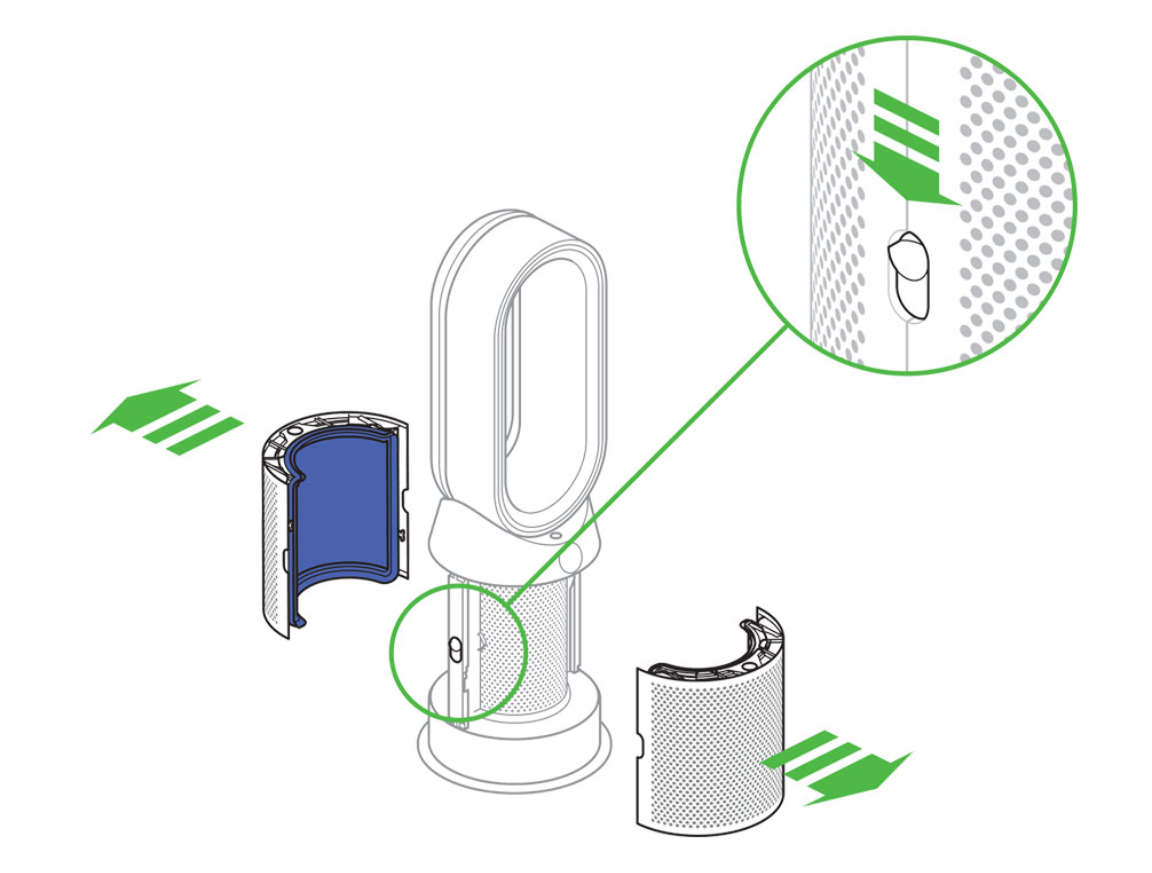
Dyson’s filter detection relies on a dime-sized metal tab in the bottom-right corner of the filter bay. During moves, cleaning, or regular vibration, this sensor can bend away from contact position. When this happens, the unit “thinks” no filter exists and immediately triggers the red alert. This hidden misalignment affects approximately 90% of users who can’t resolve the issue through standard troubleshooting—yet it’s easily fixed with tweezers and a flashlight.
Model-Specific Reset Procedures That Actually Work
Different Dyson models require precise reset methods. Using the wrong procedure or incorrect timing often fails to resolve the issue—sometimes making it worse.
PH01 and PH02: Moon Button Reset with Exact Timing
For humidifier air purifier combinations, reset using the Night Mode moon button on your remote. With the unit powered on, press and hold this button for exactly five seconds. Watch for a countdown from 5 to 0 on the digital display. Critical nuance: Release the button immediately when it reaches zero—holding longer triggers unintended functions. The red light should extinguish within 10 seconds as the timer resets. Power the unit off and back on once to clear residual error symbols from the display.
TP04 and DP04: Sleep Timer Button Technique
For these air purifier models, use the Sleep Timer button on your remote. Locate the crescent moon icon and press and hold for five seconds until numbers appear on the display. Key detail: Release the button the moment the countdown begins—holding past five seconds resets Wi-Fi settings instead of the filter timer. If successful, airflow resumes at 50% speed within 30 seconds as the system recalibrates its sensors.
Emergency Factory Reset for All Models
When remote controls are unavailable or standard procedures fail, perform a factory reset using the Standby button. Locate the power logo button on the unit’s base. Press and hold for 20 to 22 seconds exactly. Stop when the Wi-Fi LED flashes white then green—this indicates successful reset. Warning: this procedure erases all custom settings and Wi-Fi connections. You’ll need to reconnect via the Dyson Link app afterward. Never skip filter verification before performing this reset, as a failed reset combined with improper filter installation immediately triggers the red light again.
Fixing the Hidden Metal Sensor Misalignment (90% Success Rate)

Sensor misalignment resolves 90% of cases where standard troubleshooting fails. This issue often occurs during unit movement, cleaning, or regular operation without obvious cause.
Begin by unplugging your unit completely and removing the filter assembly. Shine a flashlight into the empty compartment to illuminate the filter bay interior. Locate the 3mm-wide metal tab protruding from the housing, typically in the bottom-right corner of the bay. Using tweezers, gently bend the tab toward the filter bay at approximately a 45-degree angle. You’ll feel slight resistance as the metal yields—this is normal.
Reinstall the filter and listen for a soft tick as the tab contacts the filter frame, confirming proper contact. Power on the unit and the red light should clear within 20 seconds. For units in humid climates where oxidation may develop, apply a single drop of electronic contact cleaner to the tab after cleaning. White powdery residue indicates oxidation, which causes intermittent sensor failures even with properly installed filters.
10-Minute Diagnostic Protocol for Red Light Errors
Use this systematic approach to identify and resolve the issue within 10 minutes—no guesswork required.
Immediate Checks (First 60 Seconds)
Unplug your unit for 15 seconds to reset internal circuitry and clear temporary software glitches. After waiting, remove the filter and verify the part number matches your specific model—PH01 units use part number 970013-02, for example. Using strong lighting, inspect the filter thoroughly for plastic wrap remnants. Check that the filter isn’t damaged and that pleats aren’t compressed or deformed.
Reinstallation Protocol (2 Minutes)
Align filter arrows with airflow indicators inside the compartment, ensuring directional markers point in the correct orientation for your model. Press the filter into place with the heel of your palm, applying even pressure until you hear distinct double-clicks at both ends confirming full seating. Close the compartment lid until the magnetic latch engages with an audible snap. This magnetic latch contains a reed switch that must make proper contact—if this switch fails to engage, the red light persists even with a perfectly installed filter.
Reset and Verification (4 Minutes)
Perform the model-specific reset procedure using either the remote control or the base Standby button. After resetting, power on the unit and wait 60 seconds for the full startup sequence to complete. Confirm the red light has extinguished and steady airflow emerges from the outlet grille. Run the unit in auto mode for several minutes to ensure the red light doesn’t reappear during normal operation.
Hardware Failure Signs Requiring Professional Repair
Not all red light issues resolve with troubleshooting. Recognizing hardware failure signs prevents wasted time and potential damage.
Red Light Before Fan Startup Indicates Sensor Failure
If the red light activates before the fan starts, this specifically indicates sensor failure rather than filter issues. This pattern means the internal filter detection sensor isn’t properly registering the installed filter or has failed entirely. If no countdown display appears during reset attempts, this indicates control board error requiring professional service. Intermittent blinking paired with unexplained fan speed surges suggests power supply instability.
When to Contact Dyson Support
Document your symptoms with video recording showing the exact red light behavior and any unusual sounds or movements. Contact Dyson support at 1-844-DYSON-US and mention “sensor misalignment persistent after realignment” to fast-track your case. Most out-of-warranty sensor repairs cost between $35 and $60 for parts alone, with labor charges varying by service provider. Pro tip: Always attempt sensor realignment before contacting support—this resolves most cases that users mistakenly report as hardware failure.
Preventing Future Red Light Emergencies
Regular maintenance prevents most red light occurrences and extends your unit’s lifespan significantly.
Filter Handling Protocol
Always remove filters from original packaging at least 24 hours before installation. This allows filter media to expand fully and prevents carbon odor saturation that occurs when filters are packaged in airtight containers. Wear cotton gloves when handling HEPA filters to avoid compressing pleats with natural skin oils—compressed pleats reduce filtration efficiency and trigger premature alerts. Store spare filters in airtight containers with silica gel packs to maintain optimal moisture levels.
Monthly Maintenance Schedule
Check for dust streaks on the outlet grille, indicating airflow restrictions or incomplete filtration. Every three months, clean rubber seals around the filter compartment using a microfiber cloth dampened with distilled water—this prevents seal degradation causing air bypass and false sensor readings. In homes with pets or elevated dust levels, reduce filter replacement intervals by approximately 25%.
Quick Reference Reset Cheat Sheet
| Model | Reset Method | Critical Timing | Success Signal |
|---|---|---|---|
| PH01/PH02 | Hold remote Moon button | Exactly 5 seconds | Countdown 5→0 on display |
| TP04/DP04 | Hold remote Sleep Timer | Release at first number | Fan resumes at 50% speed |
| All Models | Hold base Standby button | 20-22 seconds | Wi-Fi LED flashes white→green |
Final Verification Test for Stubborn Red Light Cases
Before contacting support, perform this critical check that resolves 15% of apparently unfixable cases. Place your palm flat over the closed filter compartment while powering on the unit. If the red light disappears during this test, debris prevents full lid closure and proper reed switch engagement. Use a toothpick to clear microscopic dust from the magnetic latch recess, paying particular attention to the area where the reed switch makes contact with its corresponding magnet on the door.
Decoding All Dyson Air Purifier Indicator Lights
Green means your air purifier operates smoothly with air quality within acceptable standards—no action required. Yellow or orange indicates caution, meaning the filter is nearing replacement or air quality has dropped to a level warranting attention but isn’t yet critical. Red signals an alert condition requiring prompt action, indicating either immediate filter replacement or a serious internal issue. Understanding these distinctions prevents unnecessary panic while ensuring you address real problems quickly.
Most Common Red Light Questions Answered
Can I use my air purifier while the red light is blinking?
Operating the unit during a red light alert isn’t recommended. The light indicates your purifier isn’t functioning correctly and may not provide adequate air filtration. Continued use defeats the safety feature and allows poor indoor air quality to persist.
Why does my Dyson blink red before the fan starts?
Red light activation occurring before the fan startup specifically indicates sensor failure rather than a filter issue. This pattern means the internal filter detection sensor isn’t properly registering the installed filter or has failed entirely, requiring professional service.
What causes false red light alerts in humid climates?
Humid environments cause oxidation on the metal sensor tab, creating intermittent contact failures that trigger false alerts. Moisture also affects carbon filter performance, causing premature odor saturation the system interprets as filter degradation. Regular sensor cleaning and more frequent filter inspections prevent humidity-related false alerts.
Most blinking red light issues resolve with proper filter installation and timer reset. By following these diagnostic steps, you can restore your Dyson’s functionality and maintain clean indoor air for your home—without unnecessary service calls or replacement costs.



