
Your Dyson air purifier works tirelessly to maintain clean indoor air, but its effectiveness depends heavily on proper filter maintenance. Many homeowners attempt to clean their filters only to discover too late that they’ve used the wrong method for their specific model. The critical first step isn’t actually cleaning—it’s proper preparation. Without identifying your exact Dyson model and obtaining manufacturer-approved instructions, you risk damaging your expensive air purifier, voiding your warranty, or worse—releasing trapped pollutants back into your home. This guide reveals the essential preparation steps you must complete before attempting to clean your Dyson air purifier filter, ensuring you have the precise information needed for successful maintenance.
The consequences of skipping proper preparation can be severe. Dyson engineers design each air purifier model with specific filter configurations that demand tailored cleaning approaches. What works for one model could permanently damage another. Some filters contain delicate HEPA media that requires dry cleaning only, while others incorporate washable pre-filters that need gentle rinsing. Without knowing your exact model’s requirements, you’re essentially gambling with your air purifier’s performance and longevity. By following these preparation steps first, you’ll gather the model-specific information that transforms filter cleaning from a risky guessing game into a precise maintenance procedure that preserves your machine’s effectiveness.
Locate Your Dyson Air Purifier’s Serial Number Before Cleaning
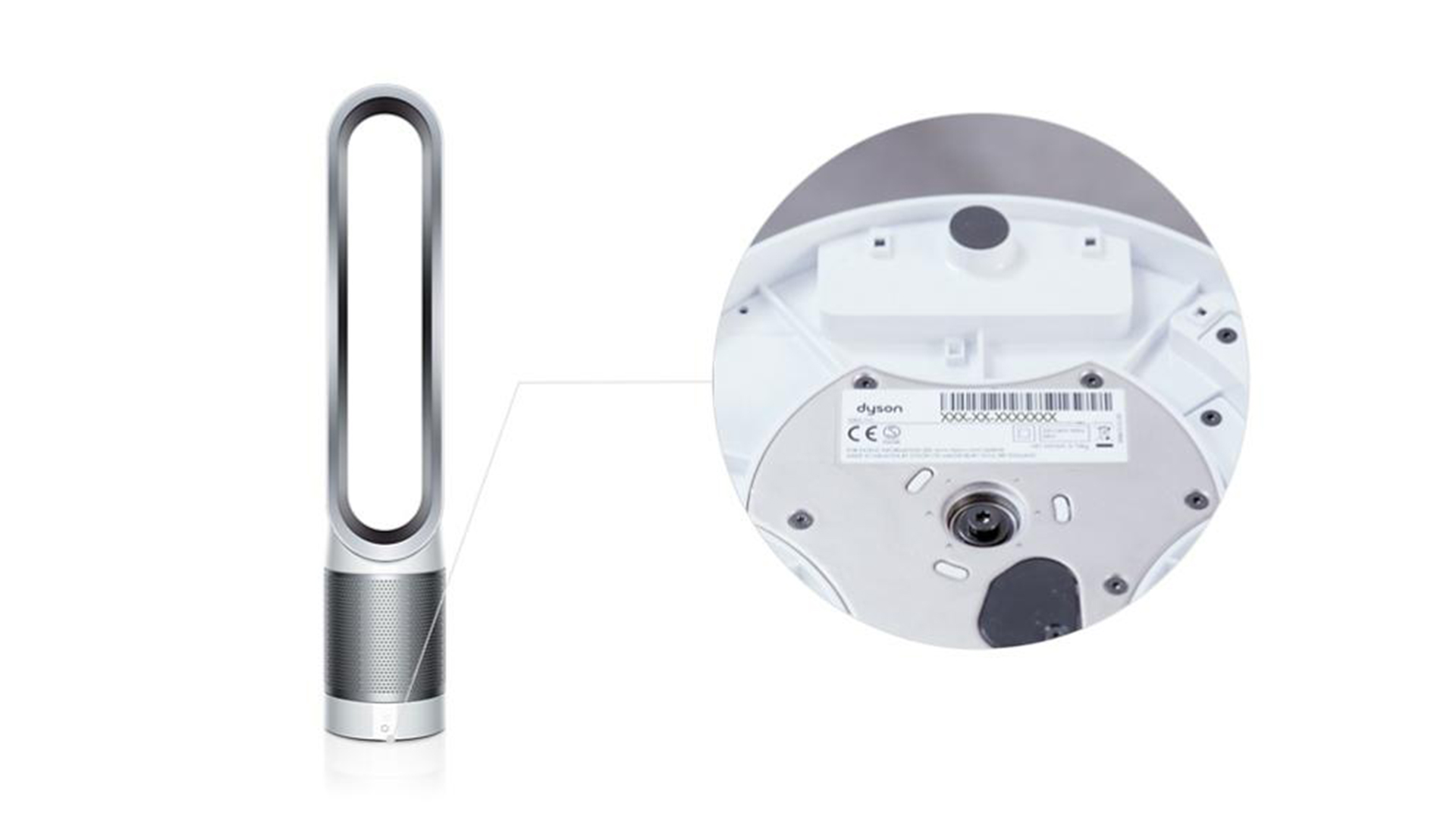
Your machine’s serial number is the master key to unlocking the correct filter cleaning instructions for your specific Dyson model. This unique identifier contains critical information about your unit’s configuration, manufacturing date, and regional specifications that determine the appropriate maintenance procedures. Without it, you’re navigating blind when it comes to filter care.
The serial number label appears on your air purifier itself, but its exact location varies by model. Check these two primary areas thoroughly:
- Bottom surface: Many Dyson models place the label on the underside of the unit. You’ll need to carefully tilt or lift your purifier to access this area.
- Rear panel: Other models position the label along the back of the machine, sometimes partially hidden behind cords or within recessed areas.
When you find the label, note the complete sequence exactly as displayed. Dyson serial numbers follow a specific format: typically three digits followed by a hyphen, regional identifiers (like “AU” or “US”), another hyphen, and additional alphanumeric characters. Examples include “123-AU-A12345” or “AB1-US-A123456.” Every character matters—transcribing this information accurately ensures you receive instructions specifically designed for your machine rather than generic advice that might damage it.
Why Your Serial Number Determines Cleaning Success
Attempting to clean your filter without this identification step is like performing surgery without knowing the patient’s blood type—it might seem fine initially, but the consequences could be severe. Different Dyson models incorporate varying filter technologies that demand specific cleaning approaches:
- Some units feature combination filters with both HEPA and activated carbon layers requiring careful handling
- Others have washable pre-filters that tolerate gentle rinsing
- Certain models contain non-washable components that must never contact water
Your serial number tells Dyson support exactly which configuration you own, enabling them to provide precise guidance. Without this information, you might accidentally soak a filter designed for dry cleaning only or use abrasive methods on delicate media, compromising your air purifier’s ability to capture microscopic pollutants.
Contact Dyson Support for Model-Specific Filter Instructions
https://www.dyson.com/support/contact-us
Never rely on generic online cleaning advice for your Dyson air purifier—contact Dyson directly using your serial number to obtain official, model-specific filter maintenance instructions. The manufacturer maintains dedicated support channels specifically designed to provide accurate guidance for your particular unit. These channels ensure you receive procedures validated by Dyson engineers rather than unverified methods that could damage your machine.
Phone Support: Immediate Model-Specific Guidance
Dyson’s phone support line (800-244-0214) connects you directly with trained representatives who can access your model’s specifications using your serial number. This real-time assistance proves invaluable when you need clarification on filter handling procedures. When you call:
- Have your serial number ready for immediate verification
- Specifically request the official filter cleaning procedure for your model
- Ask for clarification on any steps that seem unclear
- Inquire about warning signs indicating when replacement is needed instead of cleaning
Phone support works particularly well when you need immediate answers to specific questions about your filter’s composition or cleaning limitations. The representative can walk you through visual inspection techniques to determine your filter’s condition before cleaning begins.
Email Support: Detailed Written Instructions
For those who prefer documented guidance, Dyson’s email support (support.sa@dyson.com) provides written filter maintenance instructions you can reference during the cleaning process. This channel offers advantages when:
- You need complex procedures documented for step-by-step following
- You want official written confirmation of maintenance recommendations
- You’re preparing for a cleaning session and want instructions in advance
When emailing, include your complete serial number and a clear request for “the official filter cleaning procedure for my specific Dyson air purifier model.” Request any available visual guides or diagrams that might accompany the written instructions. The written format allows you to print or save the guidance for easy reference during your maintenance session.
Prepare Your Workspace with Model-Approved Materials

Once you’ve obtained your model-specific cleaning instructions from Dyson, carefully review the required materials before beginning. Different filter types demand different cleaning approaches, and using inappropriate materials could damage your filter media. Your official instructions will specify exactly what you need, but common requirements include:
- Soft-bristled brush (for dry cleaning HEPA filters)
- Distilled water (for certain washable pre-filters)
- Microfiber cloths (for gentle drying)
- Designated drying area with good airflow
Critical Workspace Setup Steps
- Choose a clean, well-lit area away from dust sources where you can comfortably work
- Lay down protective covering to catch any dislodged particles during filter handling
- Gather all approved materials as specified in your Dyson instructions
- Clear adequate drying space with good airflow—some filters require 24-48 hours to dry completely
- Have your serial number and instructions visible throughout the process for reference
Never substitute cleaning materials not explicitly approved in your model’s instructions. What seems harmless—like using tap water instead of distilled—could introduce minerals that clog your filter media over time. Similarly, using paper towels instead of microfiber cloths might leave behind fibers that compromise filtration efficiency.
Recognize When Filter Replacement Outperforms Cleaning
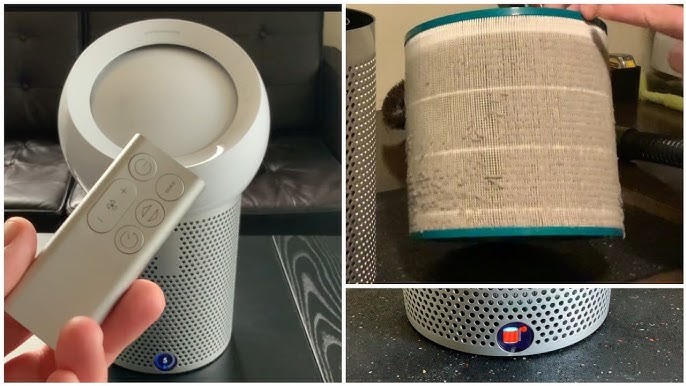
Your Dyson instructions will specify the maximum number of cleaning cycles your filter can safely undergo before requiring replacement. Most HEPA filters have a limited lifespan even with proper maintenance. Pay close attention to these critical replacement indicators:
- Filter media appears discolored or stained beyond surface dust
- Visible tears, holes, or structural damage to the filter material
- Noticeable decrease in air purifier performance after cleaning
- Odors persist despite proper cleaning procedures
- You’ve exceeded the manufacturer’s recommended cleaning cycles
The Cost of Over-Cleaning
Many users damage their filters by attempting to clean beyond the recommended limits. Each cleaning cycle degrades the filter media slightly, reducing its ability to capture microscopic particles. Continuing to clean when replacement is needed creates a false sense of security—you’re circulating air through a compromised filter that no longer provides adequate protection. Your Dyson instructions will specify the exact replacement schedule based on your model and usage patterns.
Final Filter Maintenance Protocol
Before removing your filter for cleaning, power down and unplug your air purifier completely. This safety step prevents accidental activation during maintenance. Carefully note the filter’s orientation and placement as you remove it—many Dyson models have specific insertion requirements that affect performance if installed incorrectly.
After cleaning, allow the filter to dry completely according to your model’s specifications—rushing this step introduces moisture into your air purifier’s internal components. Reinstall the filter exactly as it was positioned originally, then reset your machine’s filter indicator if applicable. Most Dyson models require this manual reset after filter maintenance to accurately track the next replacement interval.
Proper filter maintenance begins long before you touch the filter itself. By identifying your model, obtaining official instructions, preparing the right workspace, and recognizing replacement needs, you transform filter care from a potential hazard into a precise maintenance procedure. This preparation ensures your Dyson air purifier continues delivering the clean, healthy air you invested in—without risking damage to your machine or compromising your indoor air quality. Always remember: when it comes to your Dyson air purifier filter, the right preparation makes all the difference between successful maintenance and costly mistakes.



