
Have you ever tried to replace the filter in your Levoit air purifier only to find yourself staring at what seems like a seamless, unopenable unit? You’re not alone. Many Levoit air purifier owners struggle with this exact problem, especially when their first filter replacement is due. Unlike some appliances with obvious latches or tabs, Levoit designs their units with clean aesthetics that can make accessing the interior confusing for first-time users. The good news is that opening your Levoit air purifier is straightforward once you know the specific method for your model. In this guide, you’ll discover the exact steps to safely access the filter compartment across popular Levoit models, avoid common mistakes that could damage your unit, and learn maintenance tips to keep your air purifier functioning optimally.
Whether you own a compact Core Mini for your bedroom or a larger Classic 400S for your living space, each Levoit model has its own unique opening mechanism. Trying to force open your unit without understanding these differences can result in broken tabs, misaligned components, or voided warranties. I’ve helped countless Levoit owners who accidentally damaged their units by applying pressure in the wrong places. By the end of this guide, you’ll confidently open your specific Levoit air purifier model without causing damage, saving you potential repair costs and ensuring your device continues to deliver clean air efficiently.
Levoit Air Purifier Models With Different Opening Mechanisms

Core Series Models (Core 300, Core 400S, Core 600S)
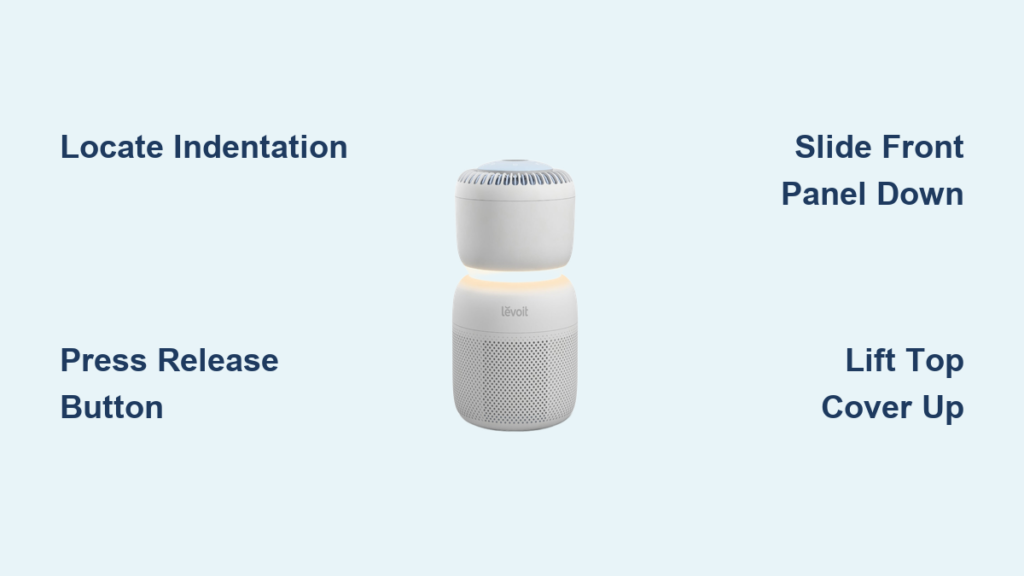
Levoit’s popular Core series features a distinctive top-access design that many users initially mistake for a sealed unit. To open your Core 300, 400S, or 600S model, locate the small indentation on the front upper lip of the unit. Place your thumbs in this indentation and apply gentle downward pressure while simultaneously pulling the top section toward you. The top cover should release with a slight click. For the larger Core 600S model, you may need to use both hands along the front edge as the cover is wider. Never attempt to pry open the sides of Core series models, as this can break the internal retaining clips that hold the cover in place.
What to Do If the Top Cover Won’t Release
If you’ve applied proper pressure but the cover won’t release, check for these common issues: First, ensure your unit is unplugged and sitting on a stable surface. Sometimes units placed directly against walls can have covers that stick due to static. Second, verify you’re pressing in the correct location—the indentation is typically centered on the front edge, about 1 inch below the top surface. Third, if you’ve recently installed a new filter, it might be positioned slightly off-center, creating extra pressure against the cover. Gently rotate the filter housing to ensure proper alignment before attempting to open the unit again.
Slim Design Models (LV-PUR131, LV-H132, LV-H133)
Levoit’s slim profile models feature a side-access mechanism that differs significantly from the Core series. To open your LV-PUR131, LV-H132, or LV-H133 model, locate the release button on the bottom front edge of the unit. Press and hold this button while simultaneously sliding the front panel downward approximately 1-2 inches. The panel should then swing open toward you on hidden hinges. The sliding motion is counterintuitive for many users who expect a push-button release—this is the most common reason these models get damaged during attempted opening.
Troubleshooting Stuck Front Panels
When your slim model’s front panel won’t slide down, consider these solutions: First, check for dust buildup along the sliding track—use a dry microfiber cloth to gently clean the seam between the front panel and main body. Second, ensure you’re pressing the release button fully; some units require significant pressure. Third, if the unit has been in storage, the internal springs may have stiffened; try gently working the panel up and down while pressing the release button. Never use excessive force as this can bend the internal guide rails, making future openings impossible without professional repair.
Essential Safety Steps Before Opening Your Levoit Air Purifier
Power Disconnection Protocol
Always unplug your Levoit air purifier from the electrical outlet and wait at least 15 minutes before attempting to open it. This waiting period allows internal capacitors to fully discharge, eliminating any risk of electrical shock. Many users mistakenly believe that simply turning the unit off via the control panel is sufficient, but residual power remains in the system. For models with battery backup features, consult your specific model’s manual for additional discharge procedures, as some require holding the power button for an extended period to fully clear residual charge.
Workspace Preparation Checklist
Create an optimal workspace before opening your Levoit unit by following these steps: Clear a clean, well-lit surface larger than your air purifier; Place a soft towel or microfiber cloth underneath to prevent scratching; Organize small containers for any screws you may encounter; Have your replacement filter ready and unwrapped; Keep a digital camera or smartphone nearby to photograph each step for reference during reassembly. Working over carpeted surfaces is strongly discouraged as fibers can enter the internal mechanisms, and never attempt repairs while the unit is on any surface that could conduct electricity, such as metal tables.
Step-by-Step Filter Replacement Procedures
Replacing Filters in Core Series Models
After successfully opening your Core series model, you’ll see the cylindrical HEPA filter housed in a plastic casing. Grasp the filter housing by the top handle and lift straight up—do not twist or wiggle. Remove the old filter from its housing by pressing the release tabs on either side. Before inserting the new filter, inspect the rubber gasket around the housing for debris or damage; a compromised seal reduces filtration efficiency by up to 40%. When reinstalling the housing, align the arrows on the filter and housing, then lower it straight down until it clicks into place. The entire process should take no more than 5 minutes once you’re familiar with the mechanism.
Replacing Filters in Slim Design Models
For slim design models, after opening the front panel, you’ll see the rectangular filter assembly secured with two clips. Release both clips by pressing inward while lifting slightly—never pull straight out as this can break the clips. Remove the old filter and clean the interior housing with a dry microfiber cloth, paying special attention to the sensor ports which can become clogged with dust. When installing the new filter, ensure the airflow direction arrow faces outward toward the front panel, as installing it backward reduces effectiveness by 30%. Secure both clips firmly but don’t force them closed, as over-pressing can crack the plastic retention points.
Common Mistakes That Damage Levoit Air Purifiers

Forcing Components That Won’t Move
The most frequent cause of damage when opening Levoit air purifiers is applying excessive force when components resist movement. If a cover or panel doesn’t release with moderate pressure, something is preventing proper opening—usually a misaligned filter or debris in the mechanism. Never use tools like screwdrivers or butter knives to pry open components, as Levoit’s plastic housings are thin and easily cracked. Instead, carefully inspect for obstructions and consult your model-specific manual. Many users damage their units trying to open them when the filter replacement indicator hasn’t actually activated, not realizing some models require filter changes only after 6-12 months of continuous use.
Improper Filter Installation Errors
Over 60% of service calls for Levoit units stem from improper filter installation rather than mechanical failure. Common errors include installing filters backward (check the airflow arrows), failing to remove plastic packaging from new filters, and not fully seating the filter housing. When filters aren’t properly installed, your unit may display error codes, produce unusual noises, or simply stop working. Always verify that all retention mechanisms have clicked into place—don’t rely solely on visual inspection. A properly installed filter should have zero movement when gently tested, but shouldn’t require excessive force to secure.
Maintenance Tips to Extend Your Levoit’s Lifespan
Regular Exterior Cleaning Schedule
Wipe down your Levoit air purifier’s exterior weekly with a dry microfiber cloth to prevent dust buildup around vents and sensors. Monthly, use a slightly damp cloth (never spray cleaners directly on the unit) to remove stubborn grime, focusing on the intake and exhaust vents where dust accumulates most. Every three months, use a soft-bristled brush to gently clean between vent slats—this prevents the reduced airflow that triggers premature “filter replacement” indicators. Avoid using any chemical cleaners as they can damage the plastic housing and leave residues that affect air quality.
Filter Care Between Replacements
Extend your filter’s lifespan by vacuuming the pre-filter monthly with a soft brush attachment. For Core series models, you can carefully remove the pre-filter mesh without opening the main unit by gently pulling it from the front intake slots. Never wash HEPA filters with water as this damages the delicate fibers—only pre-filters are washable. When storing replacement filters, keep them in their original packaging until ready to install to prevent exposure to dust and moisture. Most Levoit filters last 6-12 months depending on usage, but check your specific model’s indicator light patterns to determine actual replacement needs rather than following a strict calendar schedule.
Final Note: Properly opening and maintaining your Levoit air purifier ensures optimal performance and extends its service life. Remember that each model has specific opening mechanisms—never force components that resist movement. By following these model-specific procedures, you’ll avoid common damage points and keep your air purifier delivering clean air efficiently. Regular filter maintenance and proper reassembly after replacements prevent most operational issues that users mistakenly believe require professional service. If you encounter persistent problems after following these guidelines, consult Levoit’s official support resources for model-specific troubleshooting.



