
Your Coway air purifier delivers cleaner indoor air when properly configured and maintained, but many users miss critical setup steps that limit its effectiveness. These intelligent units automatically detect dust, pollen, pet dander, and other airborne contaminants, adjusting their purification intensity to maintain healthy indoor environments. Without proper placement, filter installation, and operational understanding, you’re not getting the full benefits of your investment. This guide reveals exactly how to use Coway air purifier models to maximize air quality in your home, whether you own the Airmega 300, 400, or another model in the lineup.
Unbox and Install Your Coway Filter Correctly
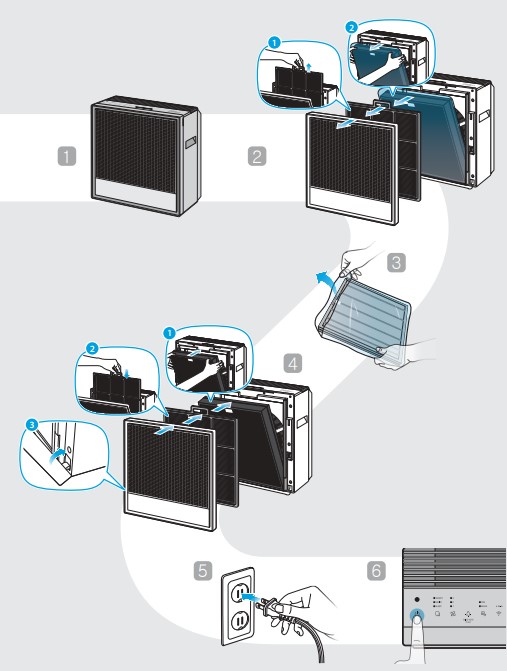
When you open your Coway air purifier box, locate the main unit with its internal motor already assembled, the separate HEPA filter wrapped in protective packaging, remote control with batteries, power cord, and model-specific user manual. Verify all components before proceeding to avoid mid-setup delays. Many users overlook the critical step of removing all plastic films from both the unit exterior and filter itself—these shipping protectors must be completely eliminated for proper airflow.
To install the HEPA filter, find the compartment access point—typically a front panel that releases with a gentle press or a bottom grille that slides out depending on your model. Insert the filter according to the orientation markers inside, ensuring it seats flush against sealing surfaces. A misaligned filter creates gaps that allow air to bypass the filtration media, dramatically reducing effectiveness. After securing the filter compartment, position your unit on a stable, flat surface near a power outlet, avoiding carpets or rugs that could block the intake vents underneath.
Position for Maximum Room Coverage
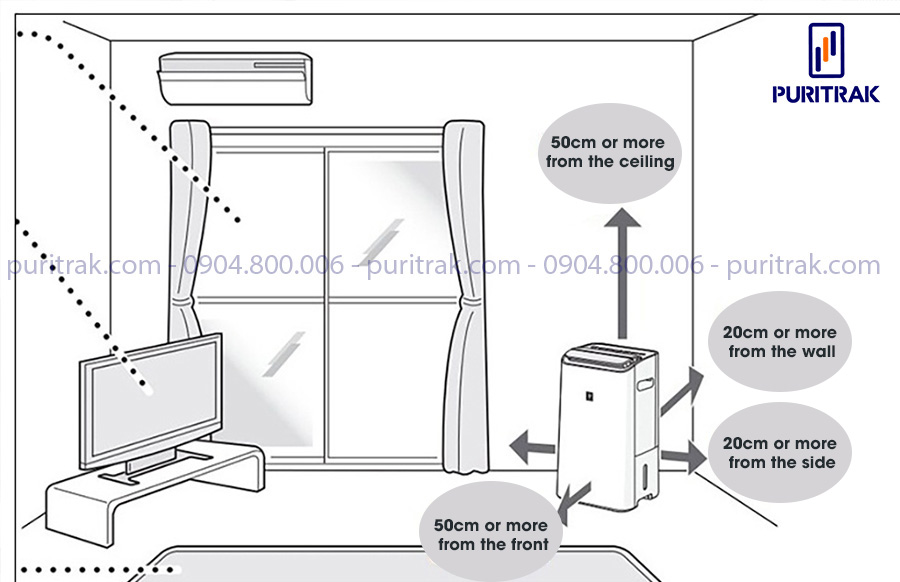
The single most overlooked factor in how to use Coway air purifier effectively is placement—where you position your unit directly impacts its ability to clean your entire room. Placing the purifier in corners, against walls, or behind furniture creates airflow restrictions that prevent contaminated air from reaching the filters. For optimal performance in spaces up to 1,000 square feet, position your unit centrally with several inches to several feet of clearance on all sides (check your model’s specific requirements).
Bedroom placement requires special consideration for allergy sufferers who need clean air during sleep. Position the unit where it draws air from your sleeping area without blowing directly onto the bed, which creates uncomfortable drafts. Many users achieve ideal coverage by placing the purifier on a nightstand opposite the bed—close enough to capture airborne allergens but far enough to prevent noise or airflow disruption to sleep.
Interpret Air Quality Indicator Lights Instantly

Coway’s color-coded LED indicator system provides immediate visual feedback about your indoor air quality without requiring app consultation. Green light means good air quality—the unit is operating at low intensity because sensors detect minimal contaminants. This is the ideal state for maintaining healthy indoor environments during normal conditions.
Yellow indicator signals moderate air pollution, triggering automatic fan speed increase to address contamination from cooking, cleaning, or outdoor pollutants entering through windows. Don’t panic when you see yellow—it means your purifier is working as designed. Red light indicates poor air quality, activating maximum fan speed to combat significant contamination from smoking, high pollen days, or disturbed dust. The unit continues at high intensity until sensors detect improved conditions, then gradually reduces speed.
Master Remote Control and Physical Buttons
The included remote control puts all essential functions within easy reach without requiring you to approach the unit. The power button toggles operation on and off, while dedicated buttons let you select manual fan speeds when you want precise control over purification intensity. Engage the auto mode button to activate sensor-based automatic operation where the unit independently adjusts speed based on real-time air quality—this setting provides optimal convenience for most daily situations.
Additional remote functions include timer settings for programming specific operating hours, display brightness adjustments for nighttime use, and filter reset capabilities. Familiarize yourself with the physical buttons on the unit itself too—they mirror remote functions and prove invaluable when remote batteries die or the remote gets misplaced. Knowing both control interfaces ensures you can operate your purifier confidently regardless of which is most accessible.
Choose Between Auto and Manual Operation Modes
For most users, auto mode delivers the most efficient and convenient operation by leveraging built-in sensors to self-manage purification intensity. When activated, your Coway continuously samples air quality and automatically adjusts fan speed in response to detected contamination levels. This means quiet operation during good air quality periods but immediate ramp-up when cooking smoke, pollen spikes, or dust disturbances occur—providing consistent air quality without constant manual attention.
Manual speed control offers precise control for specific situations. Lower speeds provide whisper-quiet operation perfect for bedrooms, nurseries, or workspaces where noise must be minimized, while still effectively circulating and filtering air. Higher speeds maximize air changes per hour and prove essential immediately after cooking, when guests who smoke visit, or during high pollen seasons when rapid allergen removal becomes critical. Many users run higher speeds during active household hours and switch to lower speeds at bedtime.
Connect and Utilize the Mobile App Fully
Coway’s dedicated mobile applications for iOS and Android unlock advanced control capabilities beyond the physical remote. Through the app, adjust all settings remotely—including fan speed, timer functions, and operating schedules—ideal when you want the purifier running before returning home. The app’s filter life tracking monitors usage based on operating hours and air quality data, providing timely replacement notifications as a percentage countdown.
Air quality history gets logged and visualized within the app, revealing patterns in your indoor environment over time. You might discover consistent air quality degradation during certain hours or after specific activities, helping you optimize placement and usage. The app also delivers firmware updates that may improve performance or add features throughout your unit’s lifespan, ensuring your investment continues to improve with age.
Execute Proper Filter Maintenance Routine
Your Coway HEPA filter requires replacement every 12-18 months depending on usage intensity and environmental conditions. Homes with pets, smokers, or high dust accumulation need changes toward the 12-month mark, while cleaner environments can often extend filter life toward 18 months. The unit tracks actual operating hours to estimate remaining life, displaying warnings through the app and control panel when replacement approaches.
Never skip the monthly pre-filter cleaning—a critical step in how to use Coway air purifier effectively. This washable pre-filter captures larger particles before they reach the main HEPA filter. Remove it and either vacuum with a soft brush attachment or rinse under running water. If using water, ensure complete drying before reinsertion—operating with a wet filter risks internal damage and mold growth. After replacing filters, always reset the filter life monitoring system through the control panel or app to clear replacement warnings.
Resolve Persistent Filter and Sensor Issues
Filter warning indicators that remain lit after replacement typically indicate a needed system reset rather than an actual filter problem. Access the filter reset function through your control panel or app to clear the warning and recalculate the new filter’s remaining life—consult your model’s manual for exact procedures as they vary between Coway generations.
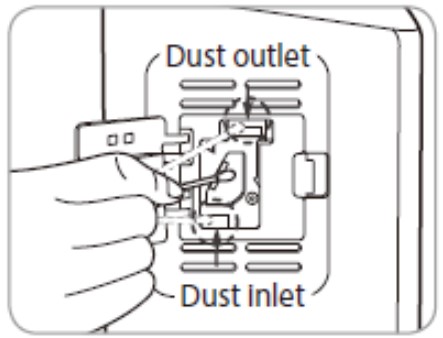
Air quality indicators showing consistently poor readings despite clean air often mean sensor contamination. The small sensor openings accumulate dust over time, interfering with accurate readings. Gently vacuum these openings using a soft brush attachment or use low-pressure compressed air to remove debris—perform this sensor cleaning every few months as part of regular maintenance.
Maximize Airflow Efficiency for Better Results
Running your Coway air purifier continuously—24 hours per day—provides the most consistent protection against airborne contaminants, made practical by its Energy Star certification. This continuous operation maintains a baseline of clean air that prevents particle buildup, whereas intermittent use allows contaminants to accumulate between cycles.
Ensure adequate space surrounds the unit on all sides, avoiding corners, walls, or furniture that restrict intake or block exhaust vents. Position where air naturally circulates—near doorways or in open areas—to help the purifier draw contaminated air more effectively and distribute cleaned air throughout the room. For large spaces, consider strategic placement of multiple units rather than relying on a single purifier to cover the entire area.
Extend Your Unit’s Lifespan with Proper Care
Wipe the exterior housing periodically with a damp cloth to remove accumulated dust that affects both aesthetics and internal component cooling. Avoid harsh chemicals or abrasive materials that might damage the finish. The display and control panel benefit from cleaning with a soft, dry cloth to maintain button responsiveness.
Register your product through Coway’s website to streamline warranty claims and support interactions. Keep your proof of purchase safe and familiarize yourself with warranty coverage details—most warranties cover defects in materials and workmanship for the main unit and motor assembly, while filters are considered maintenance items outside warranty coverage. Customer support channels including phone, email, and in-app messaging address technical questions throughout your unit’s operational life.
Pro Tip: For allergy sufferers, pet owners, and urban residents facing unique air quality challenges, combine your Coway’s continuous operation with source control measures like removing shoes at the door and maintaining appropriate humidity levels. This comprehensive approach creates measurably healthier indoor environments when properly configured and maintained—ensuring your how to use Coway air purifier knowledge delivers maximum health benefits for years to come.



