
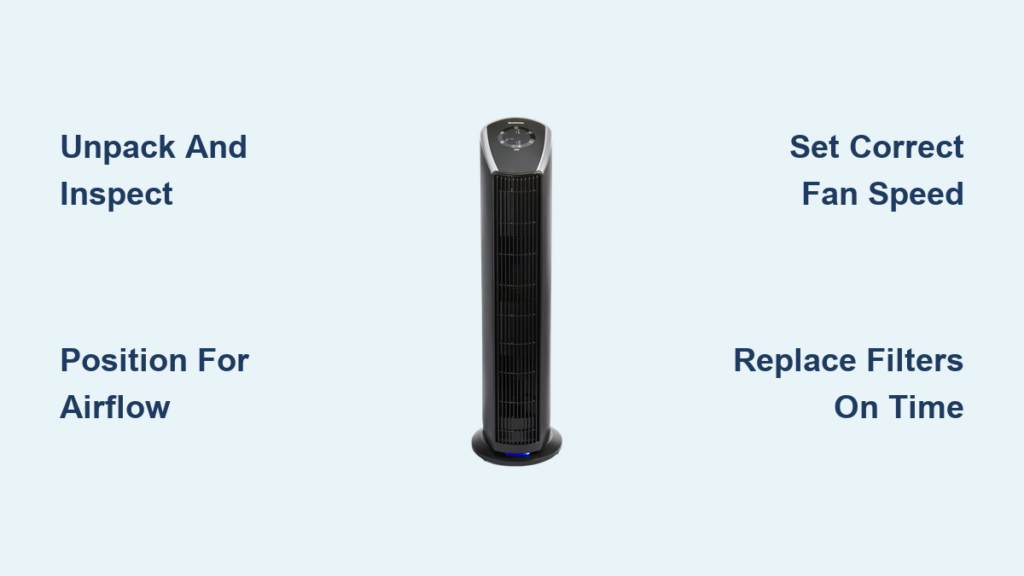
Is your Holmes air purifier sitting in the corner, barely making a dent in your home’s air quality? Many homeowners make critical mistakes when setting up their air purification systems that undermine their effectiveness. Properly using your Holmes air purifier transforms it from an expensive decoration into a powerful tool that actively removes dust, allergens, and pollutants from your indoor environment. This guide reveals the exact steps to maximize your unit’s performance, avoid common pitfalls, and ensure you’re breathing cleaner, healthier air from day one.
Understanding how to correctly operate your Holmes air purifier makes all the difference between mediocre results and truly noticeable air quality improvement. Most users simply plug in their unit and leave it running on default settings, never realizing how much more effective it could be with proper placement, settings, and maintenance. By following these expert-recommended practices, you’ll extend your purifier’s lifespan while creating a cleaner breathing environment for you and your family.
Unpack and Inspect Your Unit for Safe Operation
Before powering up your Holmes air purifier, carefully remove all packaging materials and conduct a thorough inspection for shipping damage. Check the exterior housing for dents or cracks that could compromise structural integrity and airflow. Pay special attention to the filter compartment—ensure the filter sits securely in place without any visible damage to the filter media or housing. Immediately discard any plastic wrapping covering the filter, as leaving this in place will completely block airflow and render your unit useless.
Gather all included components: power cord, user manual, and any additional filters that came with your purchase. Verify you have the correct model-specific replacement filters by checking the model number printed on the unit’s back panel. Locate a stable, flat surface away from potential hazards like water sources or high-traffic areas where the unit could be knocked over. Keep your user manual accessible for reference, especially when you need to order replacement filters or troubleshoot issues—many homeowners discard this critical resource only to regret it later.
Position Your Air Purifier for Maximum Airflow Efficiency
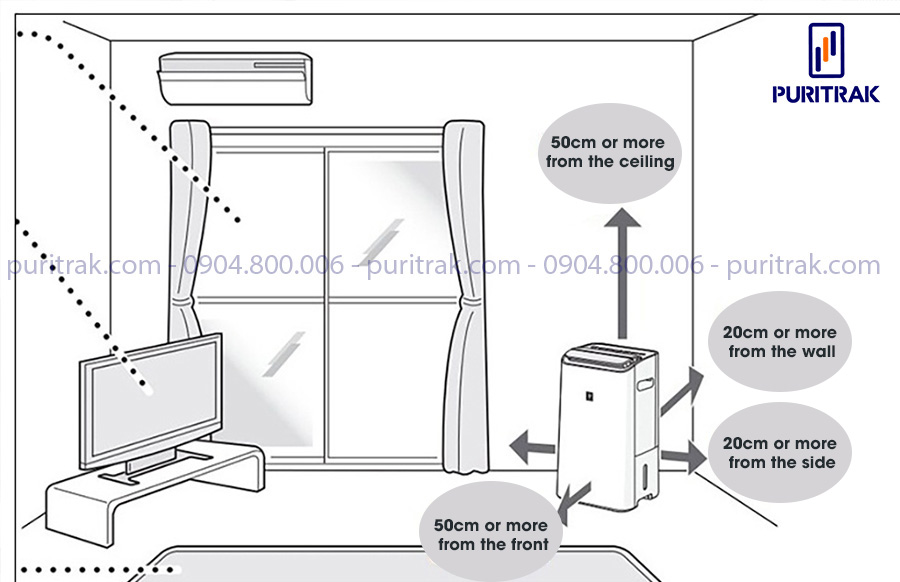
Strategic placement determines whether your Holmes air purifier works effectively or struggles to make a difference. Position the unit at least 12-18 inches away from walls, furniture, and other obstacles to ensure unrestricted airflow through both intake and exhaust vents. Placing your purifier in a corner or against a wall creates dead zones where air circulation becomes minimal, significantly reducing purification efficiency. For optimal results, center the unit in the room where air can circulate freely in all directions.
Bedrooms benefit most from air purifiers due to the extended time spent breathing in this space. Place your Holmes unit 3-6 feet from your bed, angled to direct clean air toward your sleeping position without creating uncomfortable drafts. If your model features a sleep mode with reduced noise levels, you can position it closer to your bed without disturbance. For larger rooms exceeding the unit’s recommended square footage coverage, consider running the purifier in multiple locations throughout the day or investing in a second unit for comprehensive coverage.
Power Up and Complete Initial Setup Correctly
Connect your Holmes air purifier directly to a wall outlet—never use extension cords or power strips that could cause electrical issues or void your warranty. Before switching on the unit, verify all control settings are in the off position to prevent unexpected operation. Once plugged in, press the power button and listen for the initial startup sound that confirms proper motor function. Many Holmes models require a filter reset after first installation; check your manual for the specific button combination (often holding the filter reset button for 5-10 seconds) to calibrate the filter timer accurately.
Allow the unit to run for 15-20 minutes on the lowest setting during this initial operation phase. This “break-in” period helps the motor settle and allows you to identify any unusual noises that might indicate shipping damage. Pay attention to airflow strength—your hand should feel consistent, strong air movement from the exhaust vents. If airflow seems weak during this test run, double-check that all protective packaging has been removed from the filter and that the filter is properly seated in its compartment.
Master Your Control Panel Settings for Optimal Performance
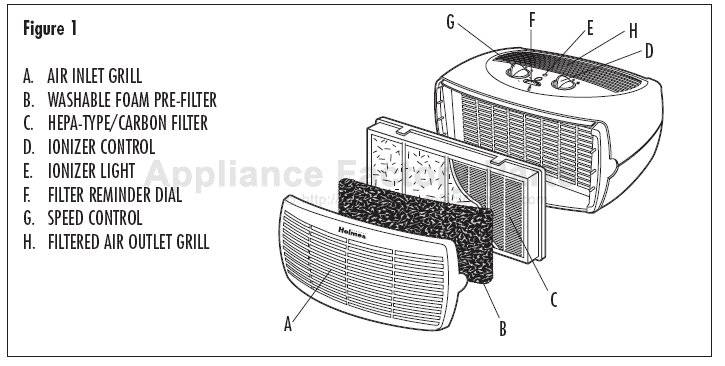
Holmes air purifiers feature intuitive control panels with essential functions that directly impact purification effectiveness. The fan speed control—typically offering low, medium, and high settings—determines both cleaning power and noise level. Low speed (1-2 on digital displays) operates quietly for continuous background purification, while high speed (3-4) delivers maximum particle capture during high-pollution periods like cooking or after vacuuming. Many models include an auto mode that uses built-in sensors to adjust fan speed based on real-time air quality readings.
Timer functions let you schedule operation for 2, 4, or 8 hours before automatic shutdown, conserving energy when you don’t need continuous purification. The filter indicator light signals when it’s time for maintenance—typically after 12 months of regular use or when the filter becomes visibly clogged. Some advanced Holmes models feature air quality indicator lights that change color (blue for good, yellow for moderate, red for poor) to show current air conditions. Understanding these indicators helps you adjust settings appropriately for your immediate environment.
Select the Right Fan Speed for Your Specific Air Quality Needs
Choosing the appropriate fan speed balances purification effectiveness with noise levels and energy consumption. For everyday maintenance when occupants are present, medium speed provides optimal balance—capturing particles effectively while maintaining comfortable noise levels below 50 decibels. Run your Holmes air purifier on low speed during sleep hours or when you need quiet operation in home offices, where noise could be disruptive.
During high-pollution events like cooking, cleaning, or high pollen days, switch to high speed for rapid air cleaning. This setting moves air through the filter more aggressively, capturing particles at an accelerated rate. Operate on high speed for 30-60 minutes after triggering activities, then return to medium or low for maintenance mode. If your model features auto mode, rely on this setting when you want hands-free operation—the sensor will automatically increase fan speed when pollution levels rise, then decrease when air quality improves.
Run Your Air Purifier Strategically for Continuous Air Quality Improvement
For truly clean indoor air, run your Holmes air purifier continuously rather than intermittently. Air quality degrades rapidly when the unit isn’t operating—within hours, particle levels return to pre-purification levels. Continuous operation maintains consistent air quality, especially important for allergy sufferers who need constant allergen reduction. Keep doors and windows closed during operation to prevent outdoor pollutants from continuously entering the space you’re trying to clean.
Create a usage schedule that aligns with your daily routine: run at medium speed during waking hours, switch to high speed during cooking or cleaning activities, and use low speed or sleep mode at night. Homes with pets or allergy sufferers benefit from 24/7 operation, while those in cleaner environments might reduce runtime to 12-16 hours daily. Monitor air quality improvements by tracking reductions in surface dust accumulation and noting any decreases in allergy symptoms—adjust your runtime accordingly based on these observable results.
Replace Filters on Schedule to Maintain Peak Performance
Your Holmes air purifier’s effectiveness depends entirely on clean, properly functioning filters. Check your filter monthly by removing it and holding it up to light—when you can no longer see through the media, it’s time for replacement. Most Holmes HEPA filters require replacement every 6-12 months depending on usage and air quality conditions, while carbon pre-filters may need changing every 3-6 months in high-pollution environments.
Never attempt to wash or clean HEPA filters—this damages the delicate fiber structure that captures microscopic particles. Only vacuum reusable pre-filters according to manufacturer instructions. When replacing filters, verify the model number matches your specific unit—using incorrect filters creates gaps that allow unfiltered air to bypass the filtration system. After installation, reset the filter indicator light using your model’s specific procedure to ensure accurate future maintenance reminders.
Clean Exterior Components to Prevent Airflow Restrictions
Dust accumulation on exterior surfaces and intake vents significantly reduces your Holmes air purifier’s effectiveness. Unplug the unit and wipe down the exterior housing weekly with a dry microfiber cloth to prevent static buildup that attracts more dust. Monthly, use a soft brush attachment on your vacuum to remove dust from intake and exhaust vents—clogged vents force the motor to work harder while reducing purified air output.
For deeper cleaning, remove the front grille according to your model’s instructions (typically by pressing release tabs or unscrewing retaining clips). Use a damp cloth to wipe all accessible surfaces, paying special attention to the area around the filter housing where dust can accumulate and create gaps. Never spray cleaning solutions directly on the unit—moisten your cloth slightly with water only, and ensure all components are completely dry before reassembly. This regular maintenance prevents dust bypass and maintains optimal airflow efficiency.
Troubleshoot Common Operational Issues Quickly

When your Holmes air purifier underperforms, systematic troubleshooting identifies solutions faster. If the unit won’t power on, verify the outlet works by testing with another device and check that the power cord is fully inserted at both ends. For reduced airflow, first inspect and clean intake vents, then check if the filter needs replacement—clogged filters account for 80% of performance issues. Unusual noises often indicate loose components or objects in the airflow path; unplug the unit and inspect for obstructions.
Persistent filter indicator lights after replacement typically require manual reset—consult your manual for the specific button sequence. If air quality indicators show poor results despite proper operation, check that doors and windows are closed during use and verify your unit is appropriately sized for the room. Most operational issues resolve with basic maintenance—only contact customer support if problems persist after following these troubleshooting steps.
Customize Settings for Specific Household Air Quality Challenges
Tailor your Holmes air purifier’s operation to address your household’s unique air quality concerns. For allergy sufferers, run the unit continuously on medium-high speed during pollen season with windows closed, and position it in bedrooms for nighttime relief when symptoms often worsen. Pet owners should select models with activated carbon filters to capture dander and odors, running the unit on high speed in pet-frequented areas for 30 minutes after grooming sessions.
For smoke removal, operate your Holmes purifier on high speed immediately after smoking incidents or during wildfire events, keeping it running continuously until air quality indicators return to normal. Those concerned with VOCs from new furniture or paint should ensure their model includes substantial carbon filtration and run it on high speed with doors closed to the affected area. Understanding your specific air quality challenges allows you to maximize your unit’s targeted effectiveness.
Establish a Maintenance Routine for Long-Term Reliability
Create a simple maintenance calendar that ensures your Holmes air purifier delivers consistent performance throughout its lifespan. Monthly tasks include exterior cleaning, vent inspection, and filter visual checks. Every three months, perform deeper cleaning of internal components and vacuum reusable pre-filters. Annual maintenance should include complete HEPA filter replacement and verification of all operational functions.
Keep replacement filters on hand so you can change them immediately when indicators alert you—delaying filter changes strains the motor and reduces air quality. Track your maintenance activities in a simple log to identify patterns and anticipate future needs. This disciplined approach extends your unit’s service life while ensuring you consistently breathe the cleanest possible air from your investment.



