You’re drifting off to sleep when a single chirp breaks the silence. Then another. And another. Your First Alert smoke detector is beeping, and you just replaced the battery. You press your ear closer, frustrated and a little worried. You are not alone. Thousands of homeowners search for answers to this exact problem every month. The good news is that most causes are easy to fix once you know what the sound means.
The most common reason for a chirping First Alert smoke detector is a low battery, but end-of-life warnings, malfunctions, and hardwired power issues are frequent culprits too. Ignoring the chirp can leave your home unprotected and disrupt your sleep for days. In this guide, you will learn what each beep pattern means, how to silence a chirping alarm after a battery replacement, and when to replace the entire unit. Let’s decode the sound and restore your peace of mind.
Decode the Beep Patterns on a First Alert Smoke Detector

First Alert alarms use specific sound patterns to communicate different conditions. Listening carefully is the fastest way to diagnose the issue. Match what you hear to the patterns below before grabbing a screwdriver.
Three Loud Beeps: Smoke or Fire Detected
- Sound: Three loud beeps, pause, repeat
- Light: Red flashing in sync with each beep
- Action: Evacuate immediately if smoke is present. Clear the air, then silence and reset the alarm
- Common triggers: Cooking smoke, steam, shower humidity, or dust entering the sensor
Four Loud Beeps: Carbon Monoxide Detected
- Sound: Four beeps, pause, repeat
- Light: Red flashes with each beep
- Action: Get everyone out of the house and call 911. Do not re-enter until professionals clear the area
- Critical: CO is invisible and odorless. Treat every four-beep pattern as a life-threatening emergency
One Chirp Every Minute: Low Battery Warning
- Sound: Single chirp every 60 seconds
- Light: Yellow flashes once per minute, then every 6 seconds
- Action: Replace the battery immediately. Use the type listed in your model manual
- Note: Sealed lithium models require full unit replacement, not a battery swap
Three Chirps Every Minute: Malfunction Signal
- Sound: Three short chirps per minute
- Light: Yellow flashes three times in sync, then every 6 seconds
- Action: Try resetting the unit. If chirping continues, replace the alarm
- Common causes: Power surges, water damage, internal component failure, or insect intrusion
Five Chirps Every Minute: End-of-Life Warning
- Sound: Five chirps every minute
- Light: Yellow flashes five times in sync, then every 6 seconds
- Action: Replace the entire unit. A fresh battery will not stop this chirp
- Lifespan: Most alarms expire after 10 years. Check the date stamped on the back
Silence a First Alert Smoke Detector Beeping After a New Battery
You followed every instruction and installed a fresh battery, yet the chirping continues. This is one of the most common complaints about smoke alarms. The fix is usually simple once you check the right things.
Verify the Battery Installation
Even a brand-new battery will fail if it is installed incorrectly. Check these details first.
- Polarity: Confirm the positive and negative ends match the markings inside the compartment
- Seating: Press the battery until it clicks. A loose connection still triggers a low-battery warning
- Type: Use the exact battery chemistry recommended in the manual, such as AA, 9V, or CR123
- Quality: Avoid mixing old and new batteries or using expired cells from a junk drawer
Make Sure the Battery Drawer Is Fully Closed
A partially open battery door is one of the top causes of post-replacement chirping.
- Push the drawer until you hear a firm latch or click
- Inspect for cracks, warping, or debris that might block the seal
- Remount the alarm on its bracket so the safety switch engages properly
Run a Full Reset on the Alarm
Stored electrical charge can keep a chirp going long after the battery is swapped. Resetting drains that residual power.
- Remove the alarm from its mounting bracket
- Take out the battery
- For hardwired units, unplug the power connector
- Press and hold the test button for 10 to 15 seconds
- Reinsert the battery with correct polarity
- Close the drawer completely
- Restore AC power if applicable and remount the unit
- Press the test button to confirm normal operation
Troubleshoot a Hardwired First Alert Smoke Detector Beeping
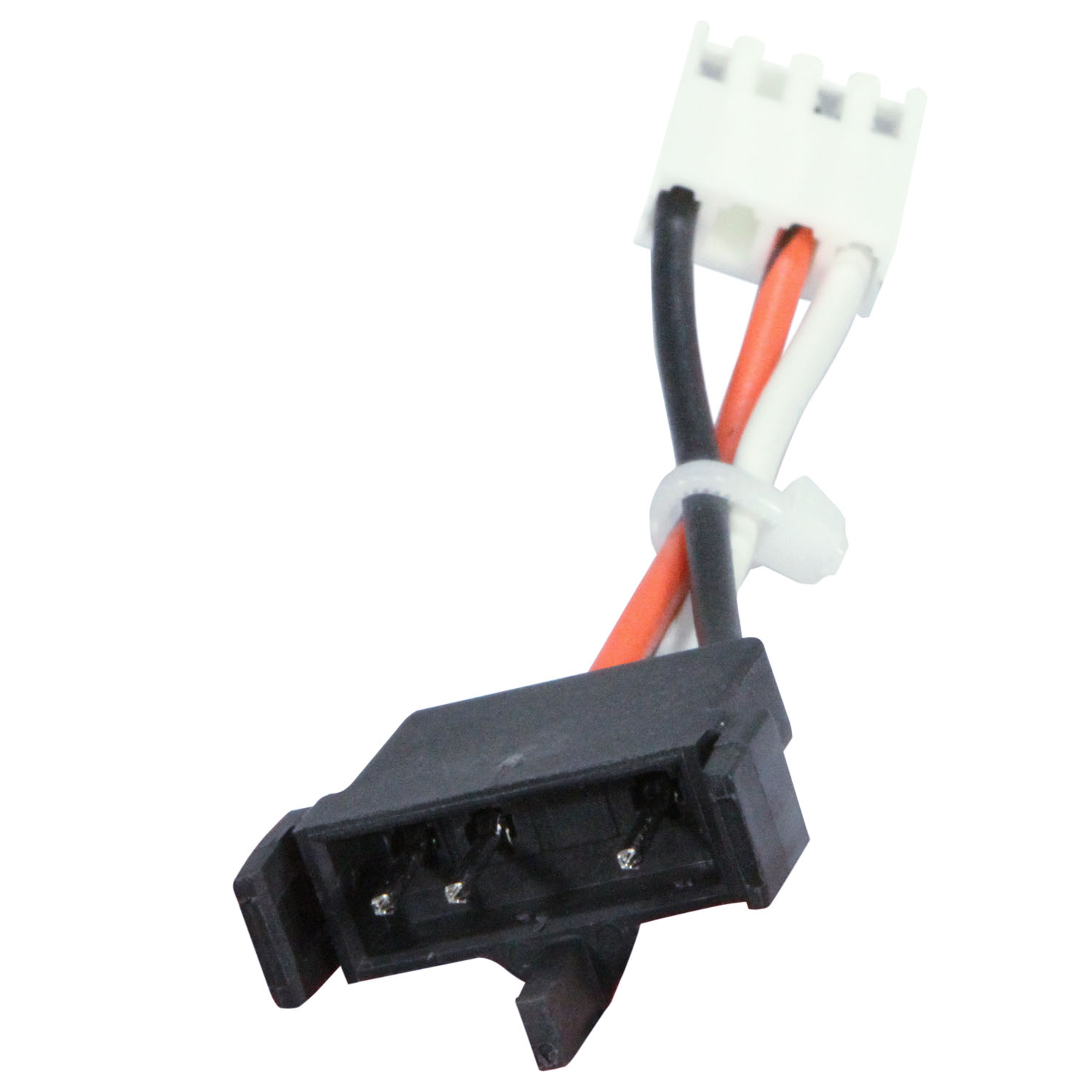
Hardwired alarms run on household electricity with a backup battery for outages. A persistent chirp often points to the AC side of the system, not the battery.
Check the AC Power Supply
- Circuit breaker: Verify the breaker for the alarm circuit has not tripped
- Wall switch: Some alarms share a circuit with a switch-controlled light. Confirm the switch is on
- Outage history: Recent power blips can confuse the alarm and trigger chirping
Inspect the Wiring and Connector
Loose wires cause many hardwired chirping problems.
- Turn off power at the breaker before touching any wiring
- Pull the alarm off its base and check that black, white, and red wires are tight
- Confirm the power plug is fully seated in the back of the alarm
- Call a licensed electrician if you see damaged insulation or scorched connectors
Test the Battery Backup Function
The backup battery only takes over during an outage. Simulate one to confirm it works.
- Turn off the breaker to the alarm circuit
- Listen for a single chirp confirming the backup engaged
- Restore power and listen for a confirmation beep
- Continuous chirping during the test suggests a faulty backup system
Identify the End-of-Life Warning on a First Alert Smoke Detector
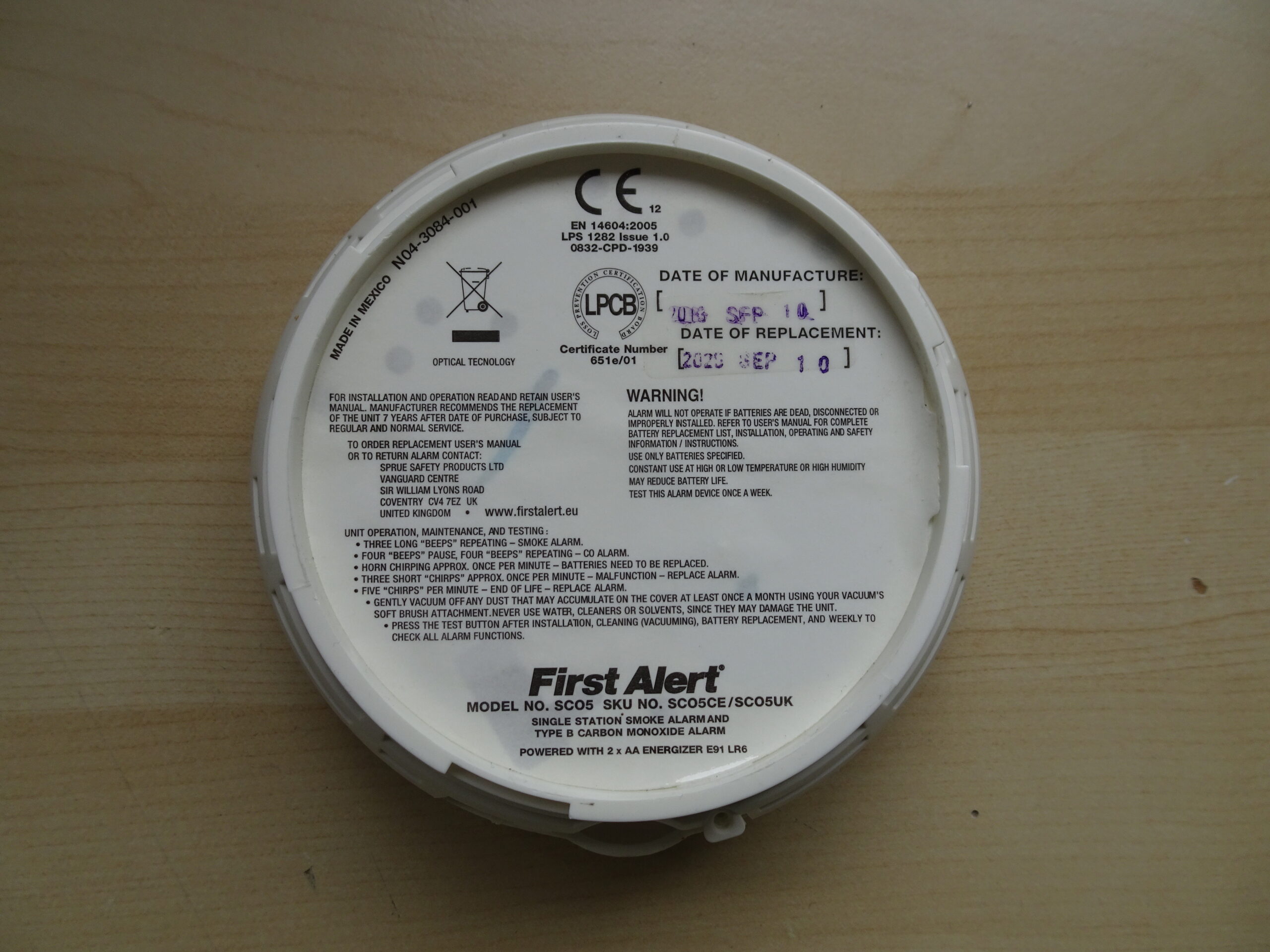
A chirping alarm with a new battery may be telling you it has reached the end of its service life. Smoke sensors lose sensitivity over time, and manufacturers require replacement on a strict schedule.
Find the Manufacture Date
- Twist or slide the alarm off its mounting bracket
- Look for a printed date code on the back or side label
- The format is usually MM/YY or YYYY
- Replace any unit older than 10 years, even if it appears to work
Recognize the End-of-Life Chirp
- Five chirps per minute with five yellow flashes
- Chirping that continues despite a fresh battery
- A pre-warning pattern of six soft descending beeps every 60 seconds
Never disable an end-of-life alarm by removing the battery. Replace the entire unit to keep your home protected.
Clean and Maintain Your First Alert Smoke Detector
Dust, pet hair, cooking grease, and insects can block the sensor chamber and cause false chirps. Routine cleaning prevents most of these issues.
Run a Deep Clean Twice a Year
- Remove the alarm from its mount
- Vacuum the vents and exterior with a soft brush attachment
- Wipe the housing with a dry microfiber cloth
- Reinstall and test the unit
Keep the Sensor Chamber Clear
- Avoid spraying cleaners, solvents, or compressed air into the unit
- Do not use water or wet cloths on the sensor
- Clean more often if the alarm is near a kitchen, workshop, or dusty area
Prevent Future First Alert Smoke Detector Beeping
Stop chirps before they start with a few simple habits. Consistency matters more than complexity.
Replace Batteries on Schedule
- Swap batteries twice a year during daylight saving time changes
- Choose long-life lithium or name-brand alkaline batteries
- Keep spare batteries in a drawer near the alarms
Test Every Alarm Monthly
- Press and hold the test button until the alarm sounds
- Confirm interconnected alarms respond together
- Reset any post-test chirps by waiting or running the reset steps above
Track the Replacement Date
- Write the install date on the side of the unit with a permanent marker
- Set a calendar reminder for the 10-year replacement
- Store the model number for quick reordering
Know When to Replace the First Alert Smoke Detector
Some alarms cannot be repaired and must be retired. Replacing promptly keeps your family safe.
Replace the Unit Immediately If:
- It is more than 10 years old
- It chirps five times per minute
- The casing is cracked, yellowed, or warped
- It fails the monthly test after troubleshooting
- It has been exposed to water, fire, or extreme heat
Choose the Right Replacement Type
- Battery-only models work well for rentals and quick installs
- Hardwired with battery backup meets most local building codes
- Sealed 10-year lithium removes the hassle of battery swaps
- Smart detectors send phone alerts for low battery, end of life, and triggered alarms
Replace every alarm in the home at the same time when they were installed together.
Frequently Asked Questions About First Alert Smoke Detector Beeping
Why is my First Alert smoke detector beeping after I changed the battery?
The battery may be installed backward, the drawer may not be fully closed, or the unit may need a full reset. An expired alarm will also keep chirping even with a new battery.
How do I reset a First Alert smoke detector after a battery replacement?
Remove the alarm from the mount, take out the battery, and hold the test button for 10 to 15 seconds. Reinsert the battery, close the drawer, remount the unit, and press the test button again.
What does it mean when a hardwired First Alert smoke detector keeps chirping?
The chirp usually points to a tripped breaker, loose wiring, a faulty power connector, or a backup battery that needs replacement. Check the AC side first, then the battery.
Can a new battery stop the end-of-life chirp on a First Alert alarm?
No. End-of-life chirping means the unit has reached its 10-year service limit. Replace the entire alarm to silence the chirp and restore protection.
How long should a First Alert smoke detector last before replacement?
Most First Alert smoke and carbon monoxide alarms last 10 years from the manufacture date printed on the back. Replace the unit as soon as it passes that date.
How often should I clean my First Alert smoke detector?
Clean the alarm every 6 months using a vacuum with a soft brush attachment. Clean more often if the unit is near a kitchen or in a dusty environment.
Key Takeaways for Silencing a First Alert Smoke Detector Beep
A chirping First Alert smoke detector is sending a message, and most messages are easy to decode. Start by counting the chirps and matching them to the patterns above. Confirm the battery is fresh, correctly installed, and seated in a fully closed drawer. Run a full reset if the chirp continues. For hardwired units, verify the breaker, wiring, and connector before replacing anything.
If the alarm is more than 10 years old or chirps five times per minute, replace the entire unit without delay. Test every alarm monthly, clean it twice a year, and swap batteries during daylight saving time. If troubleshooting does not silence the chirp, contact First Alert Support at 1-800-223-4637 or visit firstalert.com/support for model-specific help. A working alarm saves lives, so resolve the chirp today and sleep soundly tonight.