
That flashing red “CLEAN” light on your Homedics humidifier isn’t a malfunction—it’s your unit’s urgent request for maintenance. When this indicator appears, your humidifier stops producing mist because mineral deposits are compromising performance. This automatic alert activates precisely after 120 hours of operation (about 5 days of continuous use), regardless of visible buildup. Many users mistakenly think their humidifier is broken, but 95% of “not working” cases stem from ignored cleaning cycles. In this guide, you’ll discover exactly why the red light appears, how to properly clean the critical transducer component, and the precise reset technique that restores mist production within minutes.
Don’t panic when you see this warning—it’s designed to protect your humidifier’s lifespan and your indoor air quality. Ignoring it leads to reduced mist output, strange noises, or even permanent damage to the ultrasonic membrane. The good news? Resolving this issue requires no special tools, costs nothing, and takes less than 15 minutes. By the end of this guide, you’ll confidently handle red light alerts and implement simple daily habits to prevent frequent cleaning reminders.
Why Your Homedics Humidifier Shows Red Light After 120 Hours
How the Maintenance Timer Actually Works
Your Homedics humidifier contains an internal counter that tracks operation time independently of water quality or visible buildup. This timer triggers the red “CLEAN” indicator after exactly 120 hours—whether you’ve used hard tap water or distilled water. The system doesn’t detect actual mineral accumulation; it follows a strict usage schedule to prevent potential damage. If you run your unit 8 hours nightly, expect the light around day 15. Continuous 24/7 operation? The alert appears on day 5. This proactive approach ensures you clean before mineral deposits harden and cause permanent issues.
Which Models Trigger This Specific Alert
The 120-hour red light system primarily affects HoMedics TotalComfort Deluxe Dual-Tank Ultrasonic Humidifiers (black finish models), but similar mechanisms exist across most ultrasonic Homedics units. If your model displays “CLEAN” in red text or shows a solid/flashing red indicator without mist production, it follows this protocol. Units without digital displays may use a steady red light instead of text. Crucially, this isn’t an error code—it’s a scheduled maintenance reminder built into the firmware. Older evaporative models without ultrasonic technology won’t show this specific indicator.
Decoding Light Behavior Patterns
- Solid red light: Standard maintenance reminder after 120 hours (clean required)
- Flashing red light: Indicates incomplete cleaning during last reset attempt
- Immediate red reappearance: Signals residual mineral deposits after reset
- Red light with no mist: Confirms unit has halted operation due to maintenance need
Essential Pre-Cleaning Safety Protocol
Critical Power Down Steps
Always unplug your humidifier before starting. This prevents electrical hazards and protects the delicate ultrasonic transducer. Never attempt cleaning while the unit is connected to power—even residual charge can damage internal components. Wait 5 minutes after unplugging to allow capacitors to discharge. Skipping this step risks short-circuiting the control board, which would turn a simple cleaning into an expensive repair.
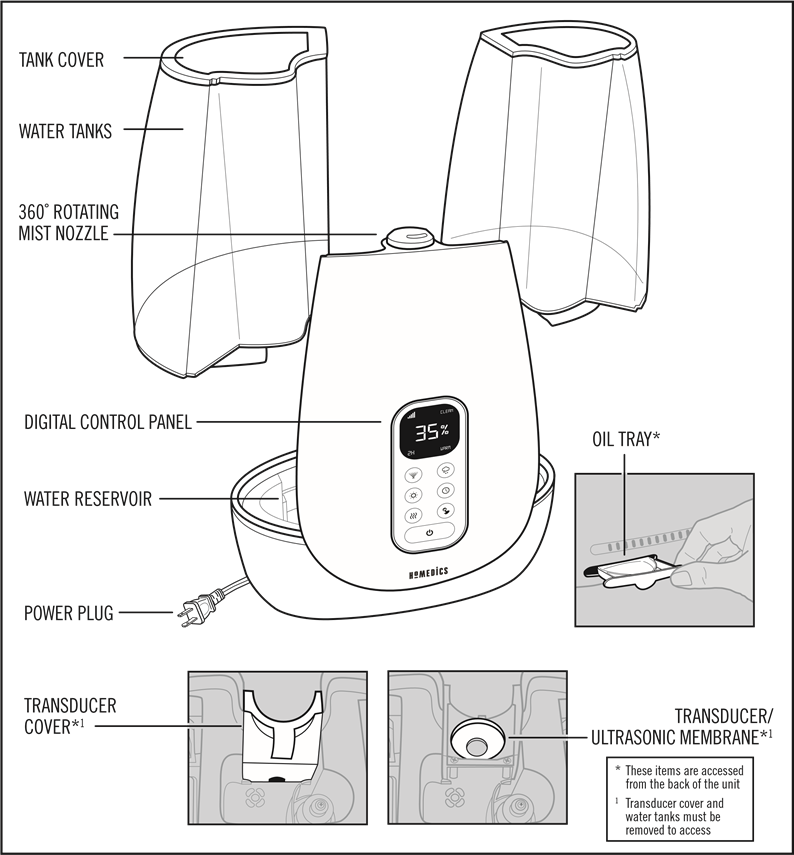
Component Disassembly Guide
- Remove the main water tank by lifting straight up
- Twist the mist nozzle counterclockwise to detach it from the base
- Pull out the water tank cap and any removable filters
- Locate the transducer cover (center disc in the base reservoir)
- Separate all parts into individual cleaning stations
Approved Cleaning Solutions Only
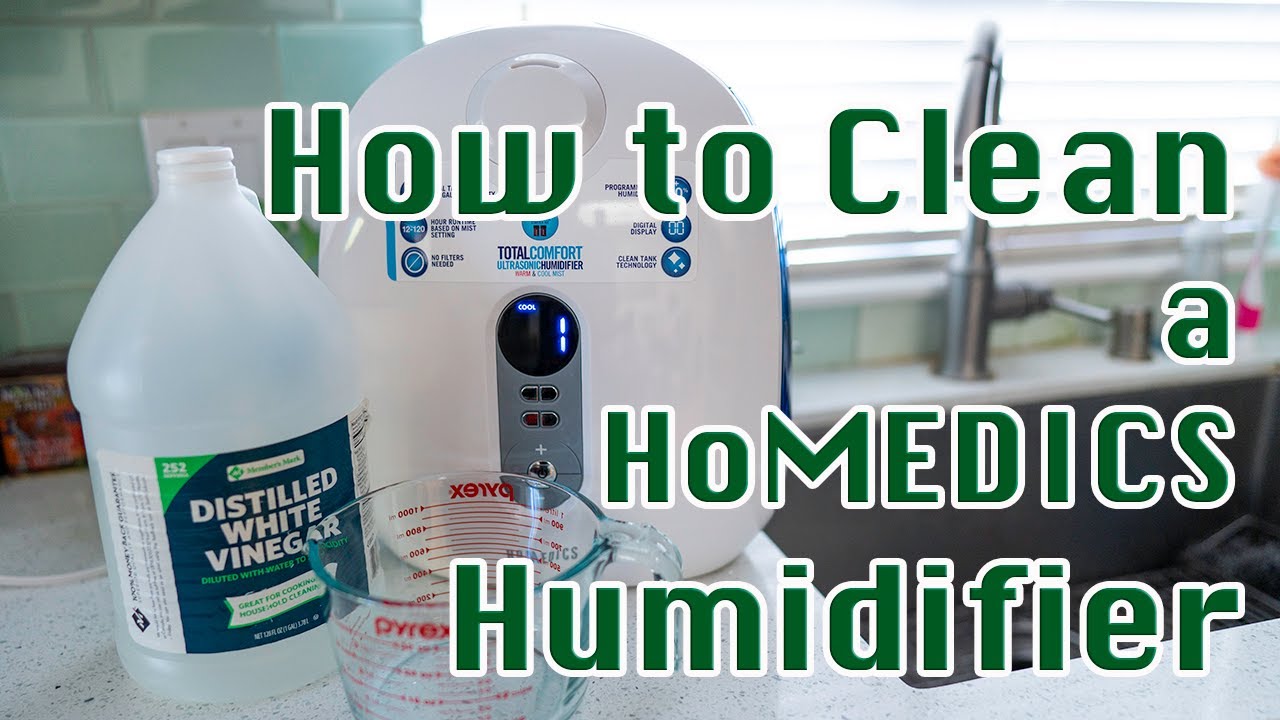
Use pure white vinegar or Homedics-approved descaling solution—nothing else. Bleach, citrus cleaners, or abrasive pads will permanently damage the transducer’s ceramic surface. Fill a container with equal parts vinegar and water for soaking. For severe buildup, use undiluted vinegar but never exceed 2-hour soak times. Remember: harsh chemicals void warranties and create toxic mist when residue remains.
Deep Cleaning the Transducer Membrane
Removing Mineral Buildup Step-by-Step
The transducer (ultrasonic membrane) is the small circular disc at the base’s center. Mineral deposits here block vibration and trigger persistent red lights. After soaking the base in vinegar for 20 minutes:
1. Dip a soft toothbrush or cotton swab in vinegar
2. Gently scrub the transducer surface in circular motions
3. Focus on the outer rim where deposits hide in crevices
4. Rinse under running water while checking for gritty residue
5. Repeat until the surface feels completely smooth to the touch
Hidden Trouble Spots You’re Missing
- Water channels: Shine a flashlight around the transducer edge to spot white crust in narrow grooves
- Float mechanism: Lift the small plastic float to clean sediment underneath
- Mist outlet: Use a pipe cleaner through the nozzle hole to clear blockages
- Reservoir corners: Wipe with vinegar-dampened cloth where water pools
Rinse and Dry Verification
Rinse all components three times under lukewarm water to eliminate vinegar traces. Hold parts against light to check for residual film—any cloudiness means repeat rinsing. Air-dry for 30+ minutes on a clean towel. Never reassemble damp parts; residual moisture tricks the sensor into thinking cleaning was incomplete. The base should feel completely dry and smell neutral before proceeding.
Correct Red Light Reset Technique
The 3-Second Power Button Method
After thorough cleaning and drying:
1. Reassemble all components correctly (misalignment causes reset failure)
2. Plug unit directly into wall outlet (no extension cords)
3. Press and hold power button for exactly 3 seconds
4. Release immediately when “CLEAN” text disappears
5. Activate mist function to confirm normal operation
This precise timing resets the internal counter. Holding too briefly won’t register; holding too long may trigger diagnostic mode. Watch for the display flicker—that’s your confirmation.
When Standard Reset Fails
If the light persists after the 3-second hold:
– Continue pressing the button up to 10 seconds while watching the display
– Stop the instant “CLEAN” vanishes (may take 5-8 seconds on older models)
– Unplug for 60 seconds, then retry the reset sequence
– Ensure no water remains in the base reservoir during reset
Post-Reset Validation Checklist
- Confirm red light stays off for 5+ minutes of operation
- Verify steady mist production (not intermittent)
- Check that timer resets (next alert in ~120 hours)
- Listen for normal high-frequency hum (no grinding sounds)
Troubleshooting Persistent Red Light Failures
Why Cleaning Often Isn’t Thorough Enough
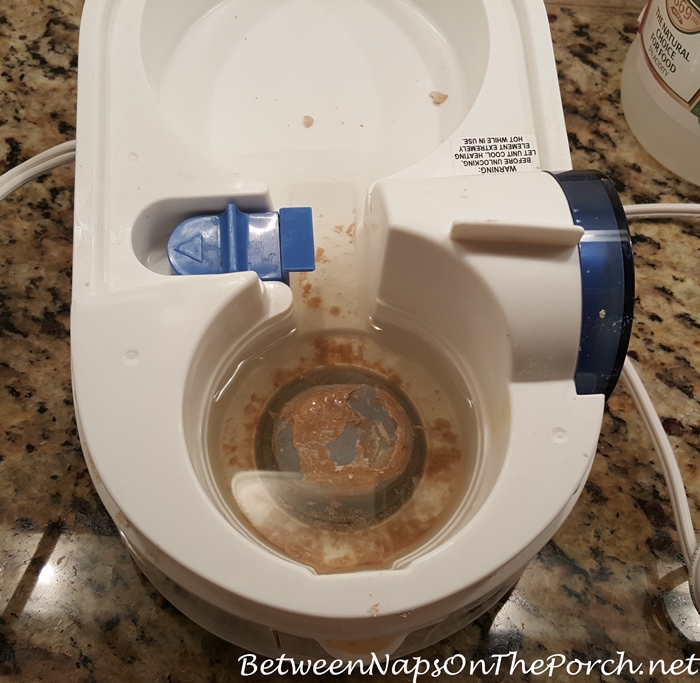
90% of reset failures occur because users miss critical areas. Common oversights include:
– Mineral crust under the plastic float mechanism
– Deposits in the transducer’s outer groove (requires angled brush)
– Vinegar residue in mist pathways
– Damp components reassembled too soon
2-Minute Diagnostic Test
- Unplug unit and remove water tank
- Shine phone flashlight into base reservoir
- Look for white chalky deposits around transducer edge
- Run finger gently over transducer—should feel glass-smooth
- If gritty or visible buildup remains, repeat cleaning
Advanced Descaling for Stubborn Buildup
For crystallized minerals that resist vinegar:
– Soak base in undiluted vinegar for 1-2 hours
– Use wooden toothpick (never metal!) to dislodge deposits
– Try commercial humidifier descaler like CLR Calcium, Lime & Rust Remover
– After cleaning, run unit with distilled water for 24 hours to flush residues
Preventing Future Red Light Alerts
Water Quality Game-Changer
Switching from tap to distilled water reduces mineral accumulation by 80%, extending cleaning cycles beyond 120 hours. If distilled isn’t practical, use filtered water from a pitcher filter. Hard water areas (white residue on faucets) need cleaning every 80 hours instead of 120—adjust your schedule accordingly.
Daily Maintenance Habits
- Empty and rinse tank daily (prevents biofilm growth)
- Wipe base dry with microfiber cloth after each use
- Check transducer weekly with flashlight for early buildup
- Never let unit run dry—automatic shutoff stresses components
Operation Best Practices
- Place unit 12+ inches from walls for proper airflow
- Match humidifier size to room dimensions (oversizing causes overwork)
- Run during daytime when you can monitor performance
- Clean immediately when light appears—delaying makes deposits harder
When Red Light Signals Real Problems
Beyond Normal Maintenance Needs
If red light returns within 24 hours of successful reset, suspect:
– Cracked transducer membrane (causes water leakage into base)
– Faulty water level sensor (float stuck in “empty” position)
– Internal timer malfunction (requires board replacement)
Professional Repair Indicators
Contact Homedics support if:
– Unit produces no mist despite proper reset
– Water leaks from base during operation
– Burning smell accompanies red light
– Display shows error codes beyond “CLEAN”
Warranty Protection Tips
Most Homedics humidifiers carry 1-2 year warranties covering electronic failures. Persistent red light issues within this period often qualify for free repair—but only if you’ve used approved cleaning methods. Document your cleaning process; technicians check for vinegar/bleach damage that voids coverage.
Quick Reference Reset Solutions
5-Minute Emergency Fix
- Unplug unit immediately
- Remove water tank and mist nozzle
- Wipe transducer area with vinegar-dampened cloth
- Dry thoroughly with hairdryer (cool setting)
- Reset using 3-second power hold
Reset Success Verification
- [ ] Transducer surface smooth under finger test
- [ ] No vinegar smell after drying
- [ ] Components fully dry before reassembly
- [ ] Power button held exactly 3 seconds
- [ ] Steady mist output within 1 minute
Safe Operation During Reset Failure
If red light won’t reset but you need humidity:
– Continue using unit while scheduling deep clean within 24 hours
– Fill with distilled water only to minimize further buildup
– Monitor for leaks or strange noises hourly
– Contact Homedics support before next cleaning cycle
That persistent red light isn’t your humidifier failing—it’s your unit protecting itself. By treating the “CLEAN” alert as a scheduled maintenance task rather than a malfunction, you’ll extend your Homedics humidifier’s lifespan by years. Remember: thorough transducer cleaning plus the precise 3-second reset solves 95% of “not working” cases. Implement daily water tank rinsing and switch to distilled water to reduce cleaning frequency. When handled promptly, this red light becomes a helpful ally in maintaining healthy indoor air—turning frustration into effortless operation.



