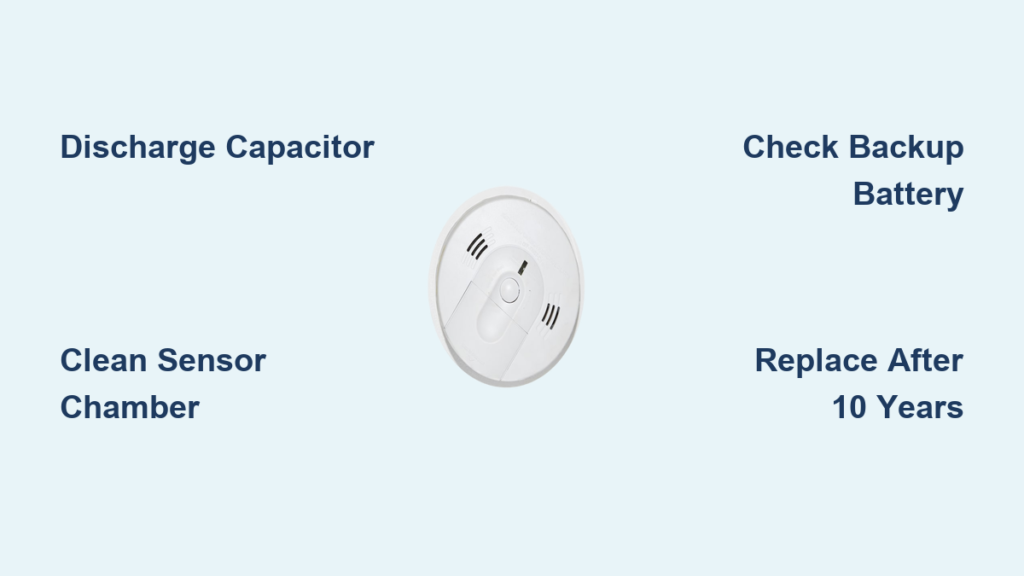
You’re not imagining it. Your smoke detector really can chirp even after you’ve pulled the battery. This frustrating, often middle-of-the-night sound is more common than most homeowners realize, and it usually has a clear explanation. The main culprit is a built-in capacitor that stores residual power, allowing the alarm to keep chirping for days after the battery is gone. Dust, hardwired power glitches, hidden backup batteries, or an aging unit can also trigger the noise.
Ignoring the chirp is risky. Smoke detectors beep to alert you to danger, whether it’s a failing component or a real fire threat. In this guide, you’ll learn exactly why a smoke detector beeps without a battery, how to stop it fast, and when it’s time to replace the unit. You’ll also discover long-term fixes like 10-year sealed detectors and smart alarms that eliminate chirping for good.
Discharge the Capacitor First
Hold the Test Button for 15 Seconds
The most common reason your smoke detector still beeps after removing the battery is residual charge in the capacitor. This small internal component stores enough power to keep the alarm active for up to seven days post-battery removal. To stop the chirping, press and hold the test button for 15 seconds. This drains the capacitor and resets the system. For some models, holding it for 10 to 20 seconds may be necessary, so don’t let go too soon.
If the chirping stops, the capacitor was the issue. But don’t assume the problem is solved permanently. This is a temporary fix. Once you reinstall a battery or restore power, the alarm will resume normal operation. If the beeping returns quickly, the unit may be old or failing.
Recognize the Chirp Pattern
Different beep patterns signal different problems:
- Rapid beeping usually indicates active smoke detection or a recent test
- Slow, intermittent chirp every 30 to 60 seconds often means the capacitor is discharging or the unit needs a full reset
- Single chirp every few minutes is a classic low-battery sign, but with no battery present, it points to residual power or sensor issues
If the chirping continues after discharging, move to deeper troubleshooting. The capacitor may be faulty, or another issue is at play.
Clean Dust and Debris Immediately

Vacuum the Sensor Chamber
Dust, cooking grease, and spider webs are silent triggers. Over time, particles accumulate inside the sensor chamber, causing false alarms even without a battery if residual power remains. Use a vacuum with a brush attachment to gently clean the exterior vents and openings. Focus on models near kitchens or bathrooms, where steam and grime build up faster.
For a deeper clean, use canned air to blow out internal components. Hold the can upright and spray in short bursts to avoid moisture damage. Never use water, cleaners, or compressed air at high pressure. This step often resolves phantom beeping, especially in units over two years old.
Avoid Common Cleaning Mistakes
- Don’t disassemble the unit unless it’s designed for it. Most smoke detectors are sealed.
- Don’t spray liquids directly onto the device. This can damage sensors.
- Don’t ignore high ceilings. Dust settles everywhere, and hard-to-reach units get neglected most.
Clean every three months to prevent buildup. If chirping returns quickly after cleaning, the sensor may be degraded, especially in older units.
Check Hardwired Power Issues
Power Cycle at the Breaker
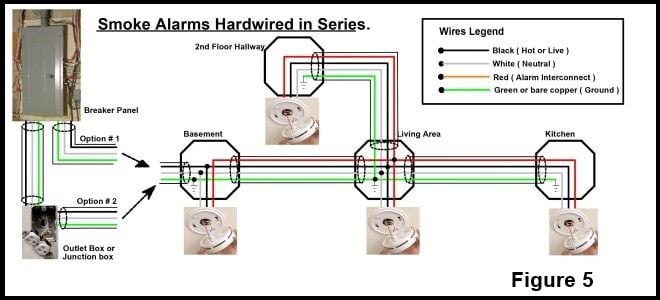
If your smoke detector is hardwired, it runs on your home’s electrical system and may still chirp due to power fluctuations or backup battery issues, even if you removed the main battery. First, turn off the circuit breaker supplying power to the alarm. Wait 30 seconds, then restore power. This resets the system and clears error codes.
If the chirping stops, the issue was likely a temporary power surge or brownout. If it continues, check for deeper electrical problems.
Inspect Wiring Connections
With power off, remove the detector from its mounting bracket. Examine the wires:
- Black (hot), white (neutral), and red (interconnect) should all be securely connected
- Look for loose, frayed, or corroded wires
- Ensure no wires are touching each other or the housing
Reconnect any loose wires and secure the unit back to the bracket. Restore power and test. If chirping persists, the wiring may need professional repair.
Find Hidden Backup Batteries
Check for Concealed Battery Compartments
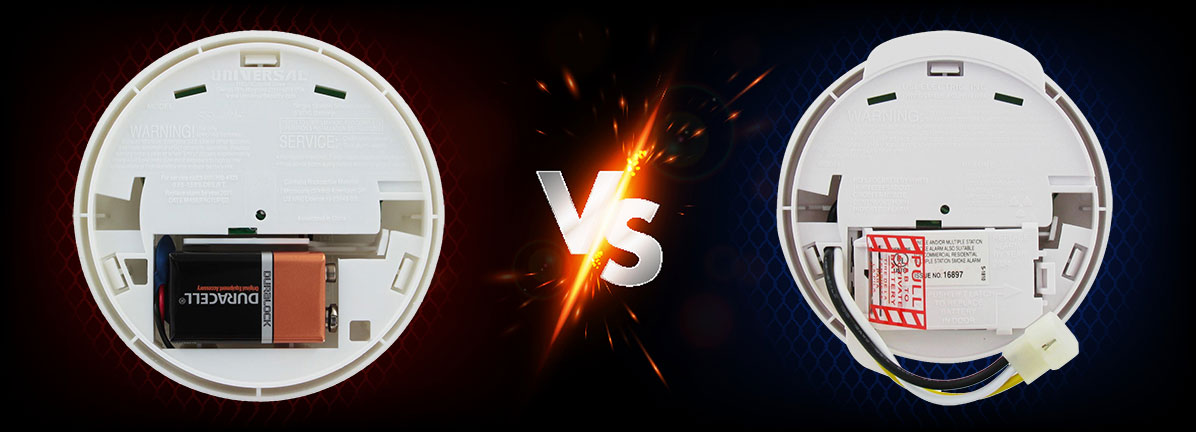
Some hardwired detectors have a hidden 9V or AA backup battery that keeps the alarm functional during power outages. Even if you removed the visible battery, this backup might still be active or dead and causing chirps. Remove the unit from the ceiling and inspect the back thoroughly. Look for a small compartment, sometimes labeled “backup” or “emergency.”
Replace the backup battery with a fresh one, even if the unit says “battery-free.” Some models misleadingly advertise no battery but still use a hidden backup for safety compliance.
Replace and Reset
After installing a new backup battery, press and hold the test button for 10 seconds to reset the system. If the chirping stops, the old backup battery was the issue. If not, the detector may be at end-of-life.
Diagnose Aging Detector Failure
Test the Unit’s Age
All smoke detectors have a 10-year lifespan. After that, sensors degrade, false alarms increase, and reliability drops. Flip the unit over and check the manufacture date stamped on the back. If it’s older than 10 years, replace it immediately with no exceptions.
Even 10-year sealed battery models must be replaced after a decade. One user reported a sealed unit failing at just 3 years, showing that lifespan isn’t guaranteed. If your detector is over 8 years old and chirping won’t stop, replacement is the safest choice.
Recognize End-of-Life Signs
- Frequent false alarms
- Chirping returns within days of battery replacement
- Unit fails self-test
- Discoloration or visible damage
These are red flags. Don’t waste time troubleshooting a dying unit. Replace it.
Upgrade to Long-Term Solutions

Install 10-Year Sealed Detectors
The best way to eliminate battery-related chirping is to remove the battery entirely. 10-year sealed detectors, like First Alert models, have a built-in lithium battery that lasts the life of the unit. No annual replacements. No low-battery chirps. When the 10 years are up, the entire unit shuts off and must be replaced.
These are now required by law in many states and municipalities. They’re slightly more expensive upfront but save money and hassle long-term. Installation is simple. Most are battery-operated or hardwired with backup.
Switch to Smart Detectors
Nest Protect and First Alert Onelink offer the ultimate in convenience:
- No chirping for low battery. Instead, you get phone alerts months in advance
- Self-testing every six weeks with a 20-second sound check
- Amber light indicator for issues, with no noise required
- Lithium batteries rated for 10+ years
- Interconnected system where all alarms sound together
Users report zero middle-of-the-night beeps over a decade. Even if Google discontinues support, existing units continue working. For peace of mind, smart detectors are worth the investment.
Use Fire Department Support
Request Free Battery Replacement
Many local fire departments offer free smoke detector battery replacement, especially for seniors or those with high ceilings. They’ll come to your home, replace the battery, and test the unit. Call your local fire station’s non-emergency number to ask.
They won’t install new detectors or recommend brands, but they can verify if the chirping indicates a real hazard or just a malfunction.
Get Safety Verification
If you’ve tried everything and the beeping continues, contact the fire department for a safety check. They can confirm whether the unit is faulty or if there’s an environmental trigger like carbon monoxide or electrical smoke. Never ignore persistent alarms.
Prevent Future Beeping
Follow a Maintenance Schedule
Prevention beats panic. Stick to this routine:
- Monthly: Press the test button on all detectors
- Quarterly: Vacuum exterior vents
- Annually: Replace batteries unless sealed
- Every 10 years: Replace the entire unit
Set calendar reminders. A few minutes a year saves nights of chirping.
Avoid Ladder Risks
For high or vaulted ceilings, use a long pole with double-sided tape to remove and replace batteries. No climbing required. Or invest in smart detectors that send alerts so you never need to check manually.
When to Replace Immediately
Unit Is Over 10 Years Old
Replace it with no exceptions. Sensors lose sensitivity, and false alarms increase. The National Fire Protection Association recommends replacement every 10 years. Don’t gamble with safety.
Chirping Won’t Stop After All Fixes
If you’ve discharged the capacitor, cleaned the unit, checked wiring, replaced batteries, and power cycled, and it still beeps, the detector is defective. Replace it. Continuing to troubleshoot an old unit wastes time and risks safety.
Visible Damage or Corrosion
Burn marks, warped plastic, or corroded battery terminals mean the unit has been stressed. Even if it seems to work, replace it. After a fire or power surge, replace all detectors in the home.
Frequently Asked Questions About Smoke Detector Beeping Without a Battery
How long will a smoke detector beep after removing the battery?
Up to seven days. The internal capacitor stores enough residual charge to keep the chirping going for about a week. Holding the test button for 15 seconds discharges it faster.
Why does my smoke detector chirp even with no battery inside?
A residual capacitor charge is the most common reason. Dust buildup, hidden backup batteries, or hardwired power issues can also cause chirping without a visible battery.
Can a hardwired smoke detector beep without a battery?
Yes. Hardwired units pull power from your home’s electrical system and often have backup batteries. Power fluctuations, loose wiring, or a dead backup battery can all trigger chirping.
Will holding the test button stop the beeping?
In most cases, yes. Pressing and holding the test button for 10 to 20 seconds drains the capacitor and resets the alarm system.
When should I replace my smoke detector instead of troubleshooting?
Replace it if it’s over 10 years old, shows visible damage, or keeps chirping after you’ve tried all standard fixes. Persistent chirping often signals end-of-life failure.
Key Takeaways for Silencing Your Smoke Detector
A beeping smoke detector without a battery isn’t a mystery. It’s a signal with a clear cause and a clear fix. Start by holding the test button for 15 seconds to discharge the capacitor. Clean dust from the sensor chamber, check for hidden backup batteries, and inspect wiring on hardwired units. If your detector is over 10 years old, replace it immediately rather than chasing phantom beeps.
For long-term relief, upgrade to a 10-year sealed detector or a smart alarm like Nest Protect. These eliminate low-battery chirps entirely and send alerts to your phone instead. Whatever you do, never disable an alarm. Your safety depends on it. Grab a ladder (or call your fire department), silence that beep for good, and sleep soundly tonight.